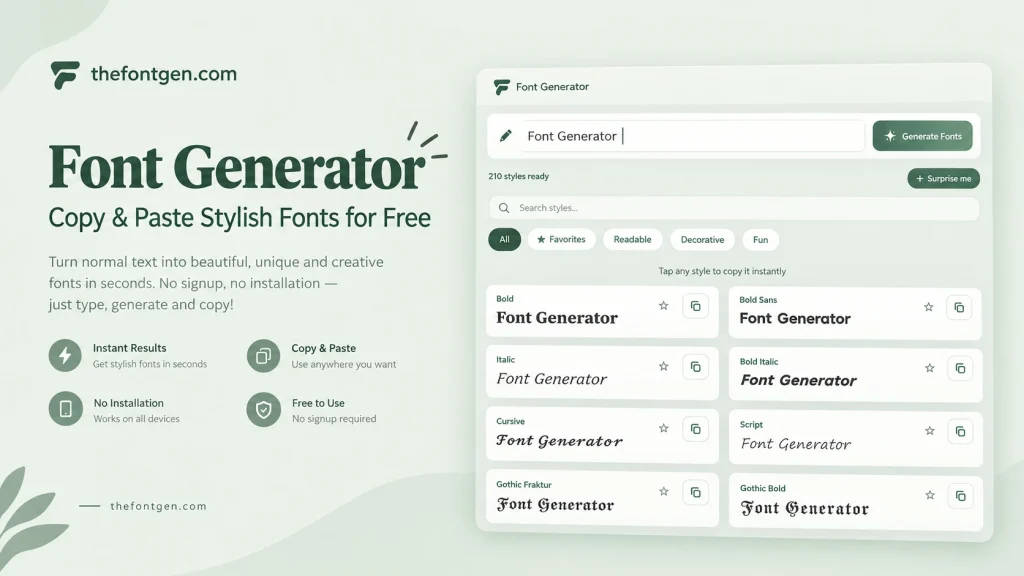
Tap any style to copy it instantly
Font Generator – 1000+ Stylish Fonts Copy and Paste
A font generator turns ordinary text into different visual styles that you can copy and use in other text fields. Enter a name, username, phrase, caption, or short message, and the results update as you type. You can compare cleaner styles with decorative and playful options without installing a typeface or opening a design app.
This font generator is built for exploration as much as conversion. You can search by style name, filter the collection, save favorites in your browser, copy a result with one click, use Surprise Me when you want inspiration, and load more variations when you want additional choices.
What Is a Font Generator?
A font generator is an online text tool that changes the appearance of your words by replacing letters with other Unicode characters or by adding marks, symbols, and decorative patterns. People commonly call the results “fonts,” but most outputs are not downloadable typefaces. Some styles change the letters themselves, while others add borders, underlines, frames, stars, or combining marks around the original text. The result is copyable text rather than a TTF, OTF, or WOFF file that you install on a device.
How to Use the Font Generator
The font generator does not need a separate Generate button. Your results update automatically, so the main task is narrowing the list and choosing a style that fits the tex
Type or Paste Your Text
Enter your text in the input field. The available transformations appear as you type, which means you do not need to enter the same text separately for every style.
For example, entering Font Generator once lets you compare it across cursive, bold, Gothic, monospace, bubble, aesthetic, and other available text styles.
Search or Filter the Styles
If you already know the look you want, use the style search. You can also switch between Readable, Decorative, and Fun filters instead of scanning the complete collection.
The Readable group is a useful starting point when clarity matters. Decorative is better for borders, marks, and stronger effects, while Fun surfaces more playful options.
Save Styles to Favorites
Use the star control when a result looks promising. Favorites are stored in your browser and moved ahead of the regular list, which makes it easier to compare a small shortlist without searching for the same style again.
Copy the Result
When you find the right version, copy it directly from the result. The tool confirms the copy action, and you can paste that text into the destination you want to test.
This is the practical idea behind fonts copy and paste searches: you get styled text that can be moved directly rather than a font package that has to be downloaded and installed.
Explore More Variations
Use Surprise Me when you want the tool to select one of the currently visible results, or choose Load more styles when you want additional mixed variations.
These controls make the font generator easier to explore when you know the general look you want but not the exact font style.
Types of Fonts You Can Generate
The font generator includes different kinds of Unicode alphabets and decorative effects. Some closely resemble familiar typography such as bold, italic, cursive, or monospace, while others use enclosed letters, alternative character sets, spacing, symbols, or decorations.
The examples below use the same text so you can see the differences more clearly.
Cursive Fonts
Cursive fonts use flowing letterforms that resemble handwriting or calligraphy. They are useful when you want text to feel softer, more elegant, or less rigid than standard letters
Example:
𝓕𝓸𝓷𝓽 𝓖𝓮𝓷𝓮𝓻𝓪𝓽𝓸𝓻
This style changes the letters themselves rather than simply placing decoration around ordinary characters. If this is the look you want, explore the dedicated cursive fonts collection for more focused examples.
Old English and Gothic Fonts
Old English and Gothic styles use angular, heavier letterforms inspired by blackletter and Fraktur writing. They create a noticeably darker and more dramatic appearance than cursive or standard serif text.
Old English example:
𝔉𝔬𝔫𝔱 𝔊𝔢𝔫𝔢𝔯𝔞𝔱𝔬𝔯
The tool also includes a heavier Gothic variation:
Gothic Bold example:
𝕱𝖔𝖓𝖙 𝕲𝖊𝖓𝖊𝖗𝖆𝖙𝖔𝖗
You can compare this style family in more depth on the gothic fonts page.
Bold Fonts
Bold fonts add visual weight while keeping familiar letter shapes. They are a useful choice when you want text to stand out without adding frames, symbols, or other decoration.
Example:
𝐅𝐨𝐧𝐭 𝐆𝐞𝐧𝐞𝐫𝐚𝐭𝐨𝐫
Because the basic form of each letter remains easy to recognize, bold is one of the more readable transformations available in the font generator. More variations are available in our bold fonts collection.
Italic Fonts
Italic text gives the letters a slanted appearance. Compared with decorative styles, the change is subtle, which makes it useful when you want a different tone without making the text visually complex.
Example:
𝘍𝘰𝘯𝘵 𝘎𝘦𝘯𝘦𝘳𝘢𝘵𝘰𝘳
Italic can also be combined with extra weight in the Bold Italic style when you want both emphasis and a slanted form.
Monospace Fonts
Monospace fonts give characters a fixed-width, technical appearance. They can resemble text from code editors, terminals, or other digital interfaces while remaining relatively easy to read.
Example:
𝙵𝚘𝚗𝚝 𝙶𝚎𝚗𝚎𝚛𝚊𝚝𝚘𝚛
This style is useful when you want a structured look without adding surrounding decoration.
Script Fonts
Script fonts have a handwritten quality but can differ from heavier cursive transformations. The Script option in the tool uses a smoother mathematical script alphabet.
Example:
ℱℴ𝓃𝓉 𝒢ℯ𝓃ℯ𝓇𝒶𝓉ℴ𝓇
Script works best when the individual letter shapes have enough space to remain recognizable.
Double-Struck Fonts
Double-struck characters are commonly associated with mathematical notation and have distinctive doubled strokes in parts of the letters.
Example:
𝔽𝕠𝕟𝕥 𝔾𝕖𝕟𝕖𝕣𝕒𝕥𝕠𝕣
The result is visually strong without requiring stars, frames, or added symbols, making it different from more decorative effects.
How to Choose the Right Font Style
A large collection is only useful when you can narrow it down. The best result depends on the length of your text, where you plan to use it, and how quickly other people need to understand it.
Start With Readability
Use cleaner options for information that needs to remain easy to recognize. Bold, italic, monospace, small caps, and some script styles usually preserve the structure of the words more clearly than heavy frames or combining marks.
A stylish font generator becomes more useful when it helps you control the amount of decoration instead of assuming that the most complex result is always the best one.
Match the Style to the Length
Short text gives you more freedom to experiment with Gothic characters, bubbles, symbols, or frames. Longer text usually benefits from a simpler design because repeated decoration can make a full sentence harder to scan.
The same principle applies even when two styles both look attractive inside the tool. Compare them at the actual length you intend to use rather than judging them from individual letters.
Use Decoration Where It Adds Something
Frames, stars, hearts, lines, and other effects can add character, but they should support the words rather than hide them.
If your goal is mainly to browse unusual designs instead of choosing one specific type, the cool fonts collection gives you another place to explore creative variations naturally.
Fonts for Social Media and Gaming
The output from the font generator can be copied and tested in many profile and text fields. These results are sometimes described as social media fonts or gaming fonts, but they remain Unicode or decorated text rather than fonts installed inside an app or game.
Support depends on the destination, which is why testing the final text is important.
Instagram and TikTok
Short profile text can handle more styling than long descriptions. A display name, short bio phrase, or caption element can use a different visual style while the rest of the content stays easier to read.
For example, you could test:
𝓕𝓸𝓷𝓽 𝓖𝓮𝓷𝓮𝓻𝓪𝓽𝓸𝓻
or:
𝐅𝐨𝐧𝐭 𝐆𝐞𝐧𝐞𝐫𝐚𝐭𝐨𝐫
in the destination field and keep whichever version displays correctly.
Discord and Gaming Profiles
Gaming-related text often uses stronger styles such as Gothic, bold, monospace, symbols, or decorated frames.
For example:
𝕱𝖔𝖓𝖙 𝕲𝖊𝖓𝖊𝖗𝖆𝖙𝖔𝖗
creates a very different visual identity from:
𝙵𝚘𝚗𝚝 𝙶𝚎𝚗𝚎𝚛𝚊𝚝𝚘𝚛
A game or server can apply its own character restrictions, so a result displayed by the font generator should still be tested before you rely on it.
Facebook, X, and YouTube
For posts, descriptions, short headings, or profile text, cleaner transformations are often easier to combine with ordinary writing.
For example:
𝔽𝕠𝕟𝕥 𝔾𝕖𝕟𝕖𝕣𝕒𝕥𝕠𝕣
creates emphasis without surrounding every character with extra decoration.
WhatsApp and Messaging Apps
Generated text can also be tested in names, messages, status text, or other fields that accept the selected characters.
For example:
Ⓕⓞⓝⓣ Ⓖⓔⓝⓔⓡⓐⓣⓞⓡ
is Unicode text, which is different from an app applying its own native bold or italic formatting to ordinary characters.
How Copy and Paste Font Styles Work
Most transformations in this font generator use Unicode characters. Unicode assigns code points to characters from writing systems, symbols, mathematical alphabets, and many other sets used in digital text.
When a normal letter is replaced by a character such as 𝐅, 𝔉, 𝔽, or 𝙵, the copied result contains that different character rather than an attached font file.
Other styles work differently. Combining marks can appear above, below, or through ordinary characters. A frame can preserve the original letters while surrounding the whole phrase with symbols.
That is why copy and paste fonts can retain much of their appearance after being moved: the alternative characters or decorations are part of the text itself.
The phrase font copy paste is often used as shorthand for the same process. The goal is to transform text, copy the result, and paste it elsewhere rather than install a new font on the device.
Why Some Letters, Numbers, or Symbols Stay Unchanged
Not every transformation contains a replacement for every possible character. When a style does not have a mapped alternative for a letter, number, punctuation mark, or symbol, the font generator can leave that character unchanged.
This is particularly noticeable in styles such as superscript, subscript, small caps, or specialized Unicode alphabets where the available character set is incomplete.
It does not automatically mean the conversion failed. It means that particular font style has no matching replacement for that character. If visual consistency matters, compare another option before copying
Fancy Letters, Frames, and Symbols
A fancy letters generator usually focuses on changing ordinary letters into unusual alternatives. This tool goes further by including transformations that add frames, marks, symbols, lines, and other decorative elements.
For example:
❝ 𝗙𝗼𝗻𝘁 𝗚𝗲𝗻𝗲𝗿𝗮𝘁𝗼𝗿 ❞
changes the letters and adds surrounding decoration.
Another result might keep the ordinary words intact:
⊱❀⊰ Font Generator ⊱❀⊰
Both are decorative, but they achieve the effect differently. One changes the character forms, while the other relies more heavily on the frame.
This distinction helps explain why the font generator can show many visually different results even when they all begin with exactly the same text.
Why a Font Style Can Look Different After You Paste It
A result can look correct inside the tool and slightly different after you paste it somewhere else. The destination controls how each Unicode character is rendered, so glyph shapes, spacing, and combining marks can vary.
Some characters may also be unsupported. In that case you might see an empty box, an unusual placeholder, misplaced marks, or a field that refuses the text.
If this happens, switch to a simpler font style, reduce the amount of decoration, or choose a result from the Readable category. The font generator preview is useful for comparison, but the final destination is the best place to verify compatibility.
When Plain Text Is the Better Choice
Decorative text is not ideal for every situation. Important instructions, contact details, long paragraphs, accessibility-sensitive content, and text that needs to remain easy to search are usually better in ordinary characters.
Some stylized Unicode alphabets were designed for specialized uses rather than general visual formatting. Assistive technology and text-processing systems may not treat them exactly like ordinary letters.
Use the font generator when styling adds useful visual character. Keep essential information simple when understanding the words matters more than how decorative they look.
Font Generator vs Downloadable Fonts
A font generator and a downloadable typeface solve different problems.
Font Generator
Transforms or decorates the text itself so you can copy and paste it.
Downloadable Fonts
A font file (TTF, OTF, WOFF) that software uses to draw characters.
Frequently Asked Questions
Conclusion
A font generator should make it easy to compare genuinely different ways of displaying the same text. Cursive, Old English, Gothic, bold, italic, monospace, script, double-struck, bubble, small caps, full-width, aesthetic, and decorative styles each create a noticeably different result.
Use search and filters to narrow the collection, save promising options to Favorites, and copy the result that matches the amount of decoration you need. Social media and gaming fields can handle different characters differently, so test the final version before using it permanently. The goal is not to choose the most complicated result. It is to find a style that gives the text the right visual character without making it unnecessarily difficult to read.