No favourites yet. Tap the star on any style to save it here.
Bubble Font Generator: Copy and Paste Bubble Letters
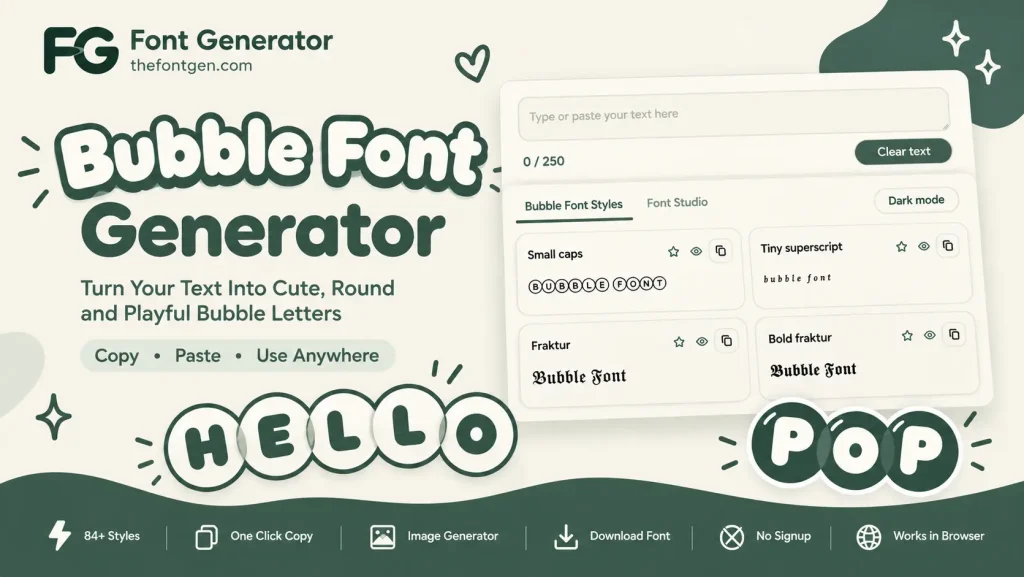
Bubble letters look soft, round and playful because each letter sits inside its own circle. The word Hello becomes Ⓗⓔⓛⓛⓞ in circled letters, and the same tool shows 84 styles as soon as the page loads, so you do not start from a single style.
Pop becomes 🅟🅞🅟 in black circled letters, which shows the darker and more solid side of bubble lettering. This Bubble Font Generator has two tabs, because one tab makes copy and paste text and the other tab makes an image, while a downloaded font remains a separate option for print work.
The first tab is called Bubble Font Styles, and it is the right choice for a bio, a display name, a caption or a comment. The second tab is called Font Studio, and it is the right choice for a thumbnail, a poster heading or a social image, because its output is a picture rather than text. Choosing the right tab at the start matters, because text and image behave differently once you leave this page.
What Are Bubble Fonts?
Bubble font are rounded letter styles that make ordinary words look like bubbles or balloons. In a copy and paste generator, the effect comes from Unicode enclosed alphanumerics, which are special characters that already look like letters inside circles.
Your device already knows how to draw many of these characters, so you do not need to install anything to read or paste them. Support can vary by operating system, app, and character, so a style that looks right on one phone may not look the same on another. That is how copy and paste fonts work: the style travels inside the characters, so no install or special app is needed.
The Unicode standard defines these enclosed characters.
Unicode characters
Font file
A bubble font in the download sense is different, because it is a font file with its own design for every letter. Titan One, Fredoka, Chewy and Bubblegum Sans are examples of installable bubble font, and they draw rounded letters on your device or in a design app
They do not change the text itself, so if you send the same words to a friend who does not have that font, the words will appear in a normal font instead. A poster set in Titan One will keep its bubbly shape only when the file is opened with that font installed.
How to Use the Bubble Font Styles Tab
Type or paste your text into the sticky box at the top of the tool, and the counter below it shows how many of the 250 characters you have used. If the box is empty, the tool shows the sample words Bubble Font, so you can see the styles before you type anything.
The Clear text button empties the box, and the dark and light mode button switches the tool between dark and light mode. The Styles tab is free to use on this page, conversion is instant as you type, and no account or signup is needed. This bubble letter generator turns that text into styles you can copy at once, and the Styles tab is the direct route for bubble letters you can copy and paste, because its output is text rather than an image.
Choose a category pill to narrow the styles, and the Bubble pill is the direct route to circled and squared letter styles. The other pills are All, Favorites, Cursive, Kawaii, Aesthetic, Tiny and Fancy, so a bubble style can also appear under a mood or size pill when it carries a decoration.
Each style card has a copy button, a star and an eye button, and clicking the card itself also copies that style. The star saves the style to your Favorites pill in your browser, so you can return to it without scrolling again. Favorites are saved in your browser, so they do not move to another device or browser on their own.
The eye button opens a larger preview of that style with its own Copy button, which is useful when a style looks small on a phone screen. When you want more styles, tap Load more styles, and each tap adds 24 more styles from the tool pool.
The Load more button does not appear in the Favorites pill, because that pill only shows styles you have already saved. You can then paste the copied version straight into a bio, a caption, a comment or a chat message, and you should check how it looks after you save it in that app.
How to Use Font Studio for Images
Font Studio is a separate tab, and it does not make copy and paste text, because it draws your words on a canvas and copies the result as an image. Start with a theme, and the six themes are Bubblegum, Lagoon, Lemon pop, Night glow, Mint soda and Sticker.
Then choose one of the 13 Google fonts in the studio, including Rubik Bubbles, Modak, Chango, Coiny, Chewy, Titan One, Bubblegum Sans, Fredoka, Baloo 2, Lilita One, Sniglet, Luckiest Guy and Boogaloo. Each font changes the shape of the letters, so the same word can look like a sticker in one font and like a soft balloon in another.
After the font, adjust size, letter spacing, outline width, 3D depth and glow with the sliders, and choose colours for the letters, the outline and the depth. Choose a transparent or solid background, and choose left, centre or right alignment for the layout.
Tap Copy image to copy the picture where your device supports image copying, and take a screenshot of the preview if image copying is blocked on your device. Text in an image is not searchable or readable by a screen reader in the same way as pasted text, so add a plain text caption when you post it. Tap Random style if you want a fresh combination without setting every slider by hand, and use that result as a starting point rather than a final design
Different Bubble Font Styles
The Bubble pill in this tool is built around five base styles, and they are Circled, Black circled, Squared, Black squared and Parenthesized. Outline bubble letters are the lightest and most widely supported style, because each letter sits inside a thin open circle.
Filled bubble letters, called black circled letters in this tool, use solid dark circles, so they have stronger contrast on a light background. Squared bubble letters use a square frame, black squared letters use white letters on a solid square, and parenthesized letters use round brackets around each letter. On a dark background, outline letters can be harder to see, so test the style on the background where you will use it.
Different types of bubble font in this tool also come from mixing those bases, because the tool can alternate two styles by letter, by word, by case or by vowel. Load more also brings versions with symbols between letters or wraps around words, with 12 joins and 28 wraps in the tool pool If you are comparing different types of font style, start with the base style first, because the base decides how clear the result will be.
A hearts wrap puts ♡ around a word, and a stars wrap puts ★ around a word, so a short greeting can carry the decoration without making the whole sentence hard to read. The best style is therefore not the fanciest one, but the one that still reads clearly in the place where you will use it.
Bubble typography in this tool is not limited to the Bubble pill, because the same page also shows cursive, tiny, fancy and aesthetic styles. A bubble letter maker for a kids profile may therefore sit next to a cursive style that suits a softer bio, and comparing the same name in cursive fonts can help you choose.
For a cheerful post, a bubble style with a hearts or sparkles wrap can suit a short greeting. Cute bubble letters suit a kids profile or a birthday post, while fancy bubble letters with a wrap suit a party caption, and a wider set of decorative styles is available in fancy fonts for comparison For cute typing in a bio or a comment, a short bubble phrase works better than a long sentence.
If you are choosing by purpose, use outline letters for a long bio, filled letters for a short heading, a decorated style for a party greeting, and Font Studio or a downloaded font for a poster or a thumbnail.
Bubble Letters and Numbers
A full bubble alphabet covers capital letters from A to Z and small letters from a to z, so most names and short phrases convert in full. The start of the alphabet looks like ⒶⒷⒸ in capitals and ⓐⓑⓒ in small letters, and the same pattern continues through the rest of the alphabet.
Numbers also have circled forms, so a date or a short number can match the letters around it. For example, the number 123 becomes ①②③ in circled digits, which keeps a birthday or a year looking consistent with bubble letters.
Symbols, spaces and punctuation do not always have a bubble version, so they often stay in their normal form inside bubble text. Accented letters and letters from other alphabets may also stay normal or fail to convert, depending on the style you choose.
Spaces between words stay as spaces, which is why bubble phrases still read as separate words rather than one long block. If a symbol matters to your message, test that exact symbol before you publish, rather than assuming it will convert.
Examples You Can Copy and Paste
Here are bubble letters copy and paste examples for short phrases, because the round shapes stay clear and friendly. Happy Birthday becomes Ⓗⓐⓟⓟⓨ Ⓑⓘⓡⓣⓗⓓⓐⓨ in circled letters, and it works well as a comment or a caption line.
Best friends becomes Ⓑⓔⓢⓣ Ⓕⓡⓘⓔⓝⓓⓢ, and the same style can turn a simple name into something that feels more personal. So cute becomes Ⓢⓞ ⓒⓤⓣⓔ in the same style, which shows how even a two word phrase can carry the bubble look without extra decoration.
The same word in all four Bubble bases shows the choice clearly. Bubble becomes Ⓑⓤⓑⓑⓛⓔ in circled letters, 🅑🅤🅑🅑🅛🅔 in black circled letters, 🄱🅄🄱🄱🄻🄴 in squared letters, and 🄑⒰⒝⒝⒧⒠ in parenthesized letters.
For bubble writing in a bio, keep the phrase short and put the most important words first, because readers usually scan a bio in a second or two. A line such as Bubbly becomes Ⓑⓤⓑⓑⓛⓨ, and it reads clearly even on a small phone screen.
A longer sentence in bubble letters can feel heavy, so use bubble text for the name, the greeting or the short tagline, and leave the rest of the bio in normal text. That balance keeps the playful effect without making the whole bio hard to read.
Bubble words for a party or a post for kids can stay very short, because one or two words carry the whole mood. A word such as Pop in black circled letters becomes 🅟🅞🅟, and it suits a heading or a single word caption
A word such as Love in circled letters becomes Ⓛⓞⓥⓔ, and it suits a comment or a short greeting.
Where to Use Bubble Text
Instagram is a common place for bubble text, and it works best in a bio, a display name, a caption or a comment. For Instagram bio lines, bubble text suits a short greeting or a nickname, while a bubble line in a caption can highlight a short announcement.
TikTok captions and display names suit bubble text for the same reason, because a short playful line stands out without needing an image. For TikTok caption lines, bubble text should stay short, so the caption still reads quickly on a phone.
Discord display names and messages can also carry bubble letters, but a server name or a username may have stricter rules, so test the exact field before you rely on it. For Discord, bubble text is safest in a display name or a message, rather than in a username that an app may reject.
WhatsApp and Roblox follow a similar pattern, with display names and messages usually accepting bubble letters more easily than usernames. For WhatsApp, bubble text suits an about line or a short status. For a Roblox display name, bubble text suits a playful profile where the platform allows styled characters
For kids profiles, party pages and cheerful posts, bubble letters fit the mood well, because the round shapes feel soft rather than formal. For a holiday caption, Christmas fonts can suit a seasonal post, while a puzzle style post can use upside down text instead of round letters. For a bolder look that still reads clearly, bold fonts can suit a heading rather than a whole bio.
Using Bubble Fonts for Posters and School Projects
When you need a poster, a logo, a thumbnail or a school project, a downloaded bubble font is usually the better tool, because you can set the size, spacing and colour with full control. Titan One is a classic round bubble letter, and it suits posters and headings that need to read from a distance.
Fredoka and Baloo 2 are rounder and softer, so they suit kids content, classroom displays and friendly branding. Chewy and Bubblegum Sans have a more playful cartoon feel, which suits party invitations, games and fun packaging.
Before you choose a font for a poster, preview Sniglet, Modak and Rampart One as well, because a preview shows the shape faster than a description.
Many Google Fonts bubble font are released under the SIL Open Font License, but a licence still needs to be checked for the exact font you choose. Some fonts on download sites are free for personal use only, so a font that is free to download is not always free to use on a product you sell.
Best bubble letter fonts lists often mix the two licence types, so read the licence line on the font page before you use a font on a product. For a school project that is not sold, a personal use font is usually fine, but check the licence line first if the work will be published or sold, and a commercial poster needs the commercial licence check first.
Downloading a bubble font starts with the TTF file, so check the licence before you install. To install a font on Windows, download the TTF file, right click it and choose Install, and on a Mac, double click the file and choose Install Font in Font Book. After installing, restart Word, Photoshop or your desktop design app, and then the new font should appear in the font list.
Canva works differently, because it runs in a browser, so upload the font through Brand Kit if you have a Pro, Teams or Education plan, and do not expect a system font to appear in Canva on its own.
The download steps are therefore simple, but the restart step is easy to miss, and a missing restart is a common reason a new font does not appear. For poster work, a downloaded bubble font should be saved as an image or a PDF, because that locks the bubble shapes in place even if the next device does not have the font.
Google Docs users can add many Google Fonts bubble font through the More fonts option in the font menu, without installing anything on their computer, but a downloaded TTF file cannot be added through More fonts. A bubble font in Google Docs suits school work and shared documents, because the font travels with the document for other Google Docs users.
For logo work, check the font at a small size and in a single colour first, because a bubbly shape that looks clear at poster size can blur at favicon or business card size. For school project work, either route can work, depending on whether the teacher will open a document or view a printed poster.
When Bubble Text Does Not Work
Bubble text can fail in a username field, because many apps only accept plain letters and numbers for usernames. If your bubble username is rejected, use bubble letters in the display name instead, and keep the username in plain text. A circled username such as Ⓑⓤⓑⓑⓛⓨ may be rejected, while plain Bubbly is usually accepted.
Some forms and apps may also strip styled characters when you paste, so paste into the exact field and check the result before you submit.
Search is another weak point, because a search engine or an in app search may not match a styled name to a plain name. For that reason, keep names, links, prices, dates and instructions in normal text, so people can still find and copy the important details.
Empty boxes are the most visible failure, and they mean the device does not have that bubble character, even though your text is still intact underneath. Older phones and some apps are more likely to show boxes for filled or squared styles, so outline bubbles are a safer first choice.
Screen readers can also read circled letters awkwardly, because they may announce each character by its Unicode name rather than as a normal word. That is one more reason to keep bubble text short and to leave longer explanations in plain text.
Character limits can also surprise you, because styled letters can count differently on some platforms. Instagram currently allows 150 characters in a bio, and a bubble version of a long bio can reach that limit sooner than the plain version.
TikTok, Discord, WhatsApp and Roblox have their own bio, about and display name limits. These limits are approximate and can change, so check the current limit in each app before publishing. If a bio is cut off after pasting, shorten the phrase or move part of it back to plain text, and the limit problem usually goes away.
How Bubble Letters Differ From Balloon and Rounded Letters
Bubble letters, balloon letters and rounded fonts are related, but they are not the same thing, and download sites often mix the tags together. Bubble letters in a generator usually mean circled letters, where each character sits inside a circle or a filled disc. A circled word such as Ⓑⓐⓛⓛⓞⓞⓝ shows the generator meaning, while a balloon font would draw fat rounded letters instead of circles.
Balloon letters in design often mean letters shaped like inflated balloons, with fat rounded strokes and soft corners, rather than letters inside circles. Rounded fonts are a wider group, and they include any font with soft corners, even if the letters are not bubbly at all.
Puffy and bubblegum are also used as tags, and they usually point to fat, soft and playful display fonts rather than to Unicode circles. A font named for bubbles on a download site may therefore be a fat rounded display font, while a bubble style in a generator is a set of circled Unicode characters.
If you want text to paste into an app, look for circled letters, and if you want a design file, look for a rounded or balloon style font by name. Checking one example word in both places will show the difference faster than reading the tags Text flip is a different effect from bubble letters, because it turns letters upside down or backwards rather than putting them inside circles.
Frequently Asked Questions
Conclusion
Bubble letters work best for a short name, greeting or heading, because the round shapes stay clear even on a small phone screen. Choose the Styles tab for text you will paste, choose Font Studio for an image you will post, and choose a downloaded font for print work where you need full control.