The ink and background colors are very similar, so the text may look bad.
Tattoo Font Generator: 133 Free Styles to Preview on 15 Body Parts
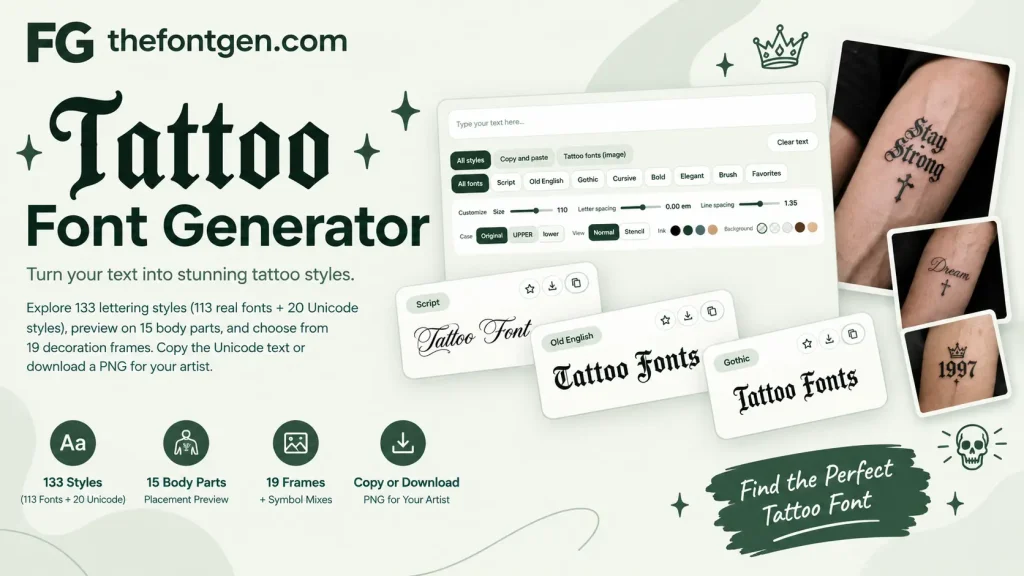
Choosing tattoo fonts is usually the hardest part of getting lettering inked. The words are ready, but the letters never look in your head the way they should on skin. This free tattoo font generator shows your own text in 133 lettering styles: 113 real fonts rendered live in your browser and 20 copy and paste Unicode styles.
Compare script, Old English, gothic and bold side by side, then open any style’s body placement preview across 15 body parts and three skin tones. Load more starts with 84 styles on screen and never really runs out: each style pairs with 19 decoration frames, like ✦ stars, ☠ skulls and ♛ crowns, and after those the tool keeps building fresh symbol mix decorations on the fly. When you like what you see, copy the Unicode text or download the styled lettering as a PNG image for your artist.
What Is a Tattoo Font Generator?
A tattoo font generator, also called a tattoo font maker, is a simple tool. This tattoo fonts generator is free: type once, compare many styles.
You type your name, date or quote once, and it shows the same text in many tattoo lettering styles at the same time. You pick the one you like, then copy the text or save it as a PNG image.
There are two kinds of tattoo letters on the internet, and the difference matters. The first kind is real font files that you download and install, usually as TTF or OTF files.
Tattoo artists use these files in their design software. The second kind is Unicode text, which looks like styled letters but is really just special characters you can copy and paste in many apps, like this: 𝔐𝔞𝔶𝔞, ℱℴ𝓇ℯ𝓋ℯ𝓇, 𝕃𝕠𝕧𝕖.
This tool gives you both in one place. The 113 font styles use real tattoo typography, actual fonts like Great Vibes, UnifrakturCook and Pirata One, loaded and rendered live in your browser so you see the true letterforms. The 20 Unicode styles are text you can copy into many apps, including Instagram, WhatsApp or your notes.
What this page does not do is hand you font files to install. If you need installable fonts for tattoos for your artist’s software, large font libraries like FontSpace and 1001 Fonts offer free downloads, and your artist can work from the PNG preview you bring from here.
How to Use the Tattoo Font Generator
Using this tattoo text generator takes less than a minute, and the tattoo lettering font generator needs no signup. Type or paste your text in the box at the top of the tool. The tool keeps your input fixed while you scroll, so you never lose your words.
As you scroll, your text appears in every tattoo font style in the grid. The first 84 styles load right away, and every Load more tap adds 24 more. The early rounds show the 133 styles plain, and partway through, decorated versions begin to appear.
The same styles return wearing 19 decoration frames, stars, crosses, skulls, swords, crowns and more. Load more never truly ends: after the fixed frames run out, the tool starts mixing its decoration symbols into brand new combinations, so fresh styles keep coming as long as you keep tapping.
Use the category pills to narrow things down, for example script only, or Old English only. The search box finds tattoo font names fast, so typing gothic or bold jumps straight to those tattoo font samples.
When a style catches your eye, tap the star to save it to favorites. On Unicode style cards, tap copy to grab the styled text for pasting.
On font styles, which are rendered in your browser with real webfonts, tap the download button on the card to save the lettering as a PNG image, or tap Preview to see the true lettering on the body placement preview. The character counter keeps you under 250 characters, which is plenty for names, dates and short quotes.
Tattoo Lettering Styles in the Tool
Good tattoo lettering starts with picking the right family. Here is what the tool covers, with real examples from the styles inside it.
For tattoo script font lettering on names, script and cursive styles are the most loved. These tattoo cursive fonts, flowing letters like Great Vibes, Pinyon Script, Allura and Parisienne, suit wrists, collarbones and ankles. For script lettering tattoo designs you can copy and paste, the tool also has Unicode script: ℳ𝒶𝓎𝒶 and a bolder cut: 𝓜𝓪𝔂𝓪. If you want a dedicated view with only flowing styles, a cursive tattoo font generator is the natural next step. Some readers search for a cursive tattoo font creator instead; either term points to the same cursive group here, and fans of pure penmanship can explore more on the cursive fonts page
Old English and blackletter styles carry the classic bold tattoo font look. Names like UnifrakturCook, New Rocker and Grenze Gotisch give that heavy traditional stroke. The Unicode twin is Fraktur: 𝔐𝔞𝔶𝔞, with a heavier bold fraktur: 𝕸𝖆𝖞𝖆. These tattoo letter fonts read best at medium size and above, since fine blackletter lines can blur in very small tattoos
Gothic styles go darker and sharper. Pirata One, Metal Mania and Sancreek bring a metal edge that suits short tattoo word fonts like Love, shown here in double struck Unicode: 𝕃𝕠𝕧𝕖. Brush handwriting like Kaushan Script and Satisfy feels personal and hand painted, closer to real handwriting than formal script.
Bold styles make sure the words read from far away. Germania One, Black Ops One and Anton are thick block letters, and the Unicode set adds bold serif: 𝐌𝐚𝐲𝐚 and clean sans bold: 𝗠𝗮𝘆𝗮. For dates and numbers, bold serif digits stay sharp: 𝟏𝟗𝟖𝟕. Elegant serif styles like Cinzel and Playfair Display suit quotes and Roman numerals with fine detail.
For the calligraphy tattoo font look, start with the tattoo calligraphy fonts in the script and elegant groups. Formal calligraphy lives there, and more styles sit on the calligraphy fonts page. For heavier display needs, the bold font generator page covers thick lettering beyond tattoo use.
Tattoo Lettering Styles Alphabet
Seeing the full alphabet helps you judge a style before you commit to it. Here is the complete A to Z in the tool’s Fraktur Unicode style, generated from the tool itself:
𝔄𝔅ℭ𝔇𝔈𝔉𝔊ℌℑ𝔍𝔎𝔏𝔐𝔑𝔒𝔓𝔔ℜ𝔖𝔗𝔘𝔙𝔚𝔛𝔜ℨ
𝔞𝔟𝔠𝔡𝔢𝔣𝔤𝔥𝔦𝔧𝔨𝔩𝔪𝔫𝔬𝔭𝔮𝔯𝔰𝔱𝔲𝔳𝔴𝔵𝔶𝔷
Tattoo alphabet fonts matter because some letters change a style’s feel. Notice the capitals C, H, I, R and Z use older legacy forms (ℭℌℑℜℨ); that is exactly how the tool renders them. The capital G or the lowercase g can make or break blackletter. Type your own full name in the tool and check every letter, not just the pretty ones. The same check works for tattoo number fonts, since digits like 𝟷𝟿𝟿𝟾 render differently across styles and you want your date to read cleanly at tattoo size.
Preview Your Tattoo on Skin With Size and Placement
This is the part most tattoo font pages skip. Every style card in this tool has a Preview button.
It opens a body placement preview built on a full figure model, so you see your lettering on a body, not just a flat card. Pick from 15 body parts: wrist, inner forearm, upper arm, shoulder, back of hand, collarbone, chest, ribs, side of neck, back of neck, upper back, hip, thigh, calf and ankle.
Switch between the left and right side on body parts that have two sides, try three skin tones, and set the letter height in centimetres, from 3 millimetres up to 4 centimetres, so the preview matches the size you plan to ink.
The preview also runs a small-size readability check. It shows your lettering at several capital letter heights, so you can see where thin strokes start to lose detail before you commit.
Why does this matter when choosing the best tattoo fonts? Letters that look perfect in a small card can look lost or crowded on a body.
Script that reads beautifully at large size may turn to mush at two inches wide. The preview gives you an approximate sense of size and placement before any needle is involved, which is exactly what a tattoo typography generator should help with.
When the placement feels right, use the card’s download button to save the styled lettering as a PNG image. That image becomes your lettering reference, the thing you show your artist instead of trying to describe a style with words.
The preview itself has no download button and is only a visual guide, not final tattoo artwork. Real results depend on your skin, anatomy, placement and your artist’s work, and the preview cannot guarantee how ink will look or how it will age. Your artist will redraw and size the final stencil and judge line thickness and spacing for you.
Tattoo Lettering Ideas for Names, Dates and Quotes
Most people come with a few classic tattoo font ideas: a name, a date, or a single word. Single word fonts for tattoos need impact over detail, so pick a style with strong letterforms and test it on the full body preview. Here is how to handle each idea with this tool
Name tattoos work best in script or cursive, and every tattoo name design should start with the real spelling typed out. Type the full name, then compare tattoo name fonts like Allura, Qwigley and Ruthie against the Unicode script ℳ𝒶𝓎𝒶. For couples and initials, try two names in a lighter script, or first initials in Old English for a bolder mark. Tattoo fonts and names work best when the style matches the person’s feel: soft script for gentle names, blackletter for strong ones.
Dates and numbers need clarity above all. Roman numerals in Cinzel look timeless, while bold serif digits 𝟏𝟗𝟖𝟕 stay readable for years. Type the date in a few tattoo number fonts and view them in the arm preview at the size you plan to ink.
Quotes and lyrics suit elegant serif or brush handwriting. Keep them short, since long quotes in decorative styles get hard to read. A cute tattoo design idea is small caps or superscript Unicode for tiny words, which keeps them minimal and neat.
The search term tattoo fonts for men is popular, and it usually points to blackletter, gothic or bold block letters like 𝕸𝖆𝖞𝖆 or Germania One. The better rule is the look you want: heavy styles for a bold statement, fine script for a lighter touch, whatever the placement. The tool’s filters let you browse by mood instead of scrolling all 133 styles.
Taking Your Design to the Tattoo Artist
A tattoo lettering design is only half done on screen. The other half happens in the studio, and walking in prepared changes the result.
Save two things from this tool. First, the PNG of your chosen lettering, saved with the download button on its card, which shows the artist the exact style you want. Second, the exact spelling of the font name, like UnifrakturCook or Great Vibes. Sharing the name can help the artist find or recreate the style. An artist can use the PNG as a visual reference and recreate or adjust the lettering in design software, so the name matters as much as the picture.
Ask your artist three things: whether the style holds up at your planned size, whether thin lines need thickening for aging, and whether they suggest small changes for your skin placement. A good artist will refine lettering for how ink settles over years. Bringing a clear reference makes their job easier and your tattoo cleaner.
Where Else to Use Tattoo Lettering
Tattoo fonts do not have to end up under skin. The 20 Unicode styles are copy and paste tattoo letters for many places where styled text is supported.
Instagram bios and captions take tattoo lettering well. A name in ℱℴ𝓇ℯ𝓋ℯ𝓇 or a date in 𝟏𝟗𝟖𝟕 adds a personal mark to a profile, and the instagram fonts page has more styles built for social profiles. WhatsApp names, gaming clan tags and photo captions work the same way, since Unicode pastes into most apps.
For a fancy style beyond tattoo themes, the fancy text generator page covers decorative Unicode for everyday use, including a fancy letter generator view for ornamental letters without the tattoo mood. You can also use the PNG downloads from the style cards as reference images for merch, posters and logo drafts before committing to final artwork.
Tattoo Fonts Not Showing Correctly?
Sometimes tattoo letters show as empty boxes, and the fix depends on the cause. Unicode styles like 𝔐𝔞𝔶𝔞 or 𝕃𝕠𝕧𝕖 need a device font that includes those characters. Most modern phones do, but some older Android phones and old apps show boxes for the rarer sets like double struck or negative squared.
If boxes appear, try a simpler style first, such as bold serif 𝐌𝐚𝐲𝐚 or monospace 𝙼𝚊𝚢𝚊, or paste into a different app. Unicode support varies by device, operating system and app, so what works in one place may not work in another
The 113 font styles are rendered in your browser with the actual webfonts, so missing Unicode characters do not affect them. If a font fails to load, check your connection and try again.
The card’s Download PNG button saves the lettering as an image file, which preserves how it looks, although it cannot be copied as editable text. If Unicode acts up on your device, use the font styles and the body placement preview for decisions, and copy Unicode only where it displays correctly.
Frequently Asked Questions
Conclusion
Tattoo fonts are a choice you live with, so ten extra minutes in this generator are worth it. Type your exact text, compare the 133 styles, check the difficult letters and digits, and study the full body preview at a realistic size.
Then bring the PNG and the font name to your artist and let them refine the rest. Good lettering is a team effort between the tool, your eyes and your artist’s hands.