Upside Down Text Generator: Flip Text, Copy and Paste
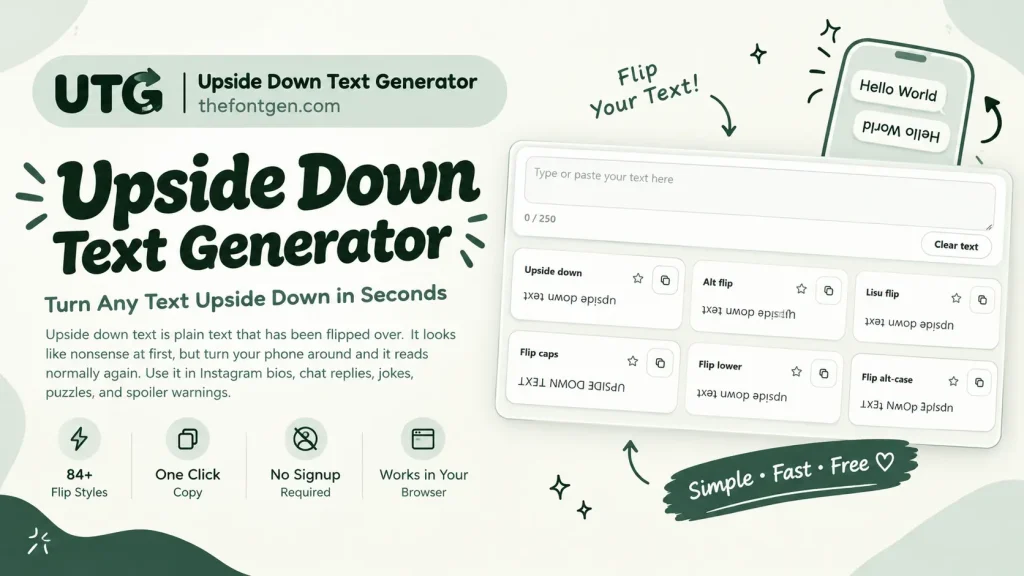
Upside down text is plain text that has been flipped over. It looks like nonsense at first, because the letters sit in reverse order with flipped shapes. Turn your phone around, and the same line reads normally again.
People use it where a normal line gets ignored: in Instagram bios, chat replies, jokes, puzzles, and spoiler warnings. Nobody writes it by hand, because every flipped letter is a special character that is hard to type. An upside down text generator makes it in seconds, and the result is plain text that pastes anywhere normal text works.
What Is an Upside Down Text Generator?
An upside down text generator turns normal text into characters that look upside down when you rotate your screen. It replaces each letter with a Unicode character that looks rotated, and flips the order so the words read correctly when turned.
For example, typing Hello gives you ollǝH, and typing funny text gives you ʇxǝʇ ʎuunɟ. You can copy the result and paste it as plain text into bios, chats, and comments. That is how copy and paste fonts work: the style travels inside the characters, so no install or special app is needed.
Turn your phone around and both examples read normally. There is no font file involved, because an upside down font is not really a font at all. This upside down text generator offers 84 flip styles across four different flip maps, with a 250 character counter, star favorites, and theme dots to round out the tool.
How to Use the Upside Down Text Generator
Using this upside down text generator takes four short moves. Follow them to write upside down text, create upside down text, or make upside down text for a joke, all from the sticky composer at the top of the page.
Type or paste your text
Type or paste up to 250 characters into the box. The placeholder says “Type or paste your text here”, and the live counter shows your count as 0 / 250 while you type. A Clear text button beside the counter wipes the box for a fresh start.
Pick a category
Six pills sort the styles in this upside down text generator: All styles, Flip, Backwards, Mixed, Lines, and Saved. The Flip pill holds the four flip maps, Backwards holds 25 reversed Unicode alphabets, Mixed blends two alphabets at a time, and Lines adds nine decorations. Every card rewrites itself around your words the moment you type, so type good morning once and compare ƃuᴉuɹoɯ pooƃ against dozens of alternatives side by side.
Copy the style you like
Tap the copy button on any card and the flipped text lands on your clipboard. A small toast confirms it with a Copied message, and if your browser blocks the clipboard, the tool falls back to a manual method that asks you to select and copy the text yourself. That is the whole upside down text copy paste routine: type, pick, copy, paste.
Save favorites and set the theme
Tap the star on any card to save it. Your picks wait under the Saved pill, which shows ★ Saved plus your count. Theme dots below the composer recolor the page, and a custom color square lets you pick any shade beyond the presets.
The same four moves work on a phone. The composer stays pinned while you scroll, so to type text upside down on mobile you follow the exact same steps. For a text generator, upside down text is unusually social: people share the result before they even decode it.
Four Flip Maps, Not One
Most upside down text generator tools ship a single character map and stop there. This upside down text generator ships four, and the difference shows on the same word.
Classic Flip
The classic map is the one most people picture. It turns Hello into ollǝH, using the oldest and most widely supported flipped lookalikes in Unicode, which is usually the set people mean when they say upside down letters.
Alt Flip
The Alt flip map swaps in a different set of lookalikes for several letters. The word go becomes oᵷ here instead of the classic oƃ.
Lisu Flip
The Lisu flip map borrows more shapes from the Lisu script block, which changes capital letters most visibly. ABC comes out as ꓛꓭꓯ in Lisu flip against Ɔᗺ∀ in the classic map.
Mirror
The Mirror map in this upside down text generator is the odd one out. It swaps letters for mirror image shapes instead of rotated ones, so Hello becomes ollɘH, where the e turns into ɘ rather than ǝ. If you want to flip letters upside down with real choice, compare the four maps in this upside down text generator and keep the one that reads best.
A few single letters are worth knowing by sight. A t upside down becomes ʇ, which is why the word text turns into ʇxǝʇ. An upside down i is ᴉ, one of the cleanest flips in the set, and a u upside down is simply n, which is why funny becomes ʎuunɟ.
The letter a upside down is ɐ, a real Unicode character that lives at code point U+0250 in the IPA Extensions block. If you are wondering how to type a upside down, just type a normal a and pick the Flip style. Some people search for upsidedown a, or type upsidedown letters when they mean the classic flip.
Flipping also covers upside down symbols, not just letters. A question mark becomes ¿ and an exclamation mark becomes ¡, so typing Really? Yes! gives you ¡sǝ⅄ ¿ʎllɐǝᴚ with the punctuation landing on the correct side.
The upside down letters Unicode provides for this trick are real characters, not images. These swapped shapes are called inverted letters by some and letters flipped by others, but the mechanism is the same in every map.
84 Styles: Backwards Alphabets, Mixed Text, and Decorated Lines
Beyond the four maps, this upside down text generator opens with 84 styles sorted into pills: All styles, Flip, Backwards, Mixed, Lines, and Saved. The Flip pill holds 20 styles, the classic flips with case and order twists, and whether you call the output upside down text or upsidedown text, it is where most people start.
Flip caps turns hello into O˥˥ƎH, while Flip lower keeps everything small and the alt-case option alternates as it goes, turning Hello into o˥lƎɥ. Three order options change how the string is arranged: keep order flips the shapes but leaves the sequence alone, so Hello becomes Hǝllo, while word flip reverses each word on its own, giving ollǝH plɹoʍ for Hello world. Word order flip swaps the words around, giving ʍoɹlp Hǝllo.
The Upside Down Alphabet From A to Z
For reference, here is what every character becomes in the classic Flip map. Lowercase: ɐqɔpǝɟƃɥᴉɾʞlɯuodbɹsʇnʌʍxʎz, uppercase: ∀ᗺƆᗡƎℲ⅁HIſ⋊˥WNOԀΌᴚS⊥∩ΛMX⅄Z, and digits: 0ƖᄅƐㄣϛ9ㄥ86. Notice that H, I, N, O, S, X, and Z stay unchanged, because they look the same upside down.
The Backwards pill is where the depth of this upside down text generator lives. It takes 25 full Unicode alphabets and flips each one two ways, fully reversed and word by word, which makes 50 styles. That gives you upside down text in bold, italic, script, fraktur, double struck, monospace, bubble, squared, wide, small caps, superscript, and more, covering the full upside down alphabet from A to Z and a to z plus digits.
For example, Hi in reversed bold becomes 𝐢𝐇, Nova in reversed script becomes 𝒶𝓋ℴ𝒩, abc in reversed bubble becomes ⓒⓑⓐ, and Love in reversed fraktur becomes 𝔢𝔳𝔬𝔏. The same script alphabet lives in our cursive creator in its normal reading order, a nice contrast to everything flipped here.
The Mixed pill blends two alphabets letter by letter or word by word, an easy route to cool upside down text that few other tools offer. Mixing bold and script turns Hi into 𝒾𝐇, alternating the two alphabets with every letter. For the full mixed-style experience, try our fancy font generator, which blends alphabets across dozens of styles.
The Lines pill in this upside down text generator adds nine decorations on top of flipped text: underline, double, strike, over, wavy, crossed, slash, spaced, and dotted. Hello with the dotted decoration becomes o·l·l·ǝ·H, and with spaced it becomes o l l ǝ H, so if you want your lettering upside down with more personality, the Mixed and Lines pills are the ones to open first.
Four Flip mix cards round out the set. Each one shuffles flipped variants with a seeded randomizer, so Hello can come out as olꞁәɥ in one card and o⅂˥ꓱH in another. Every tap on Load more adds 12 more styles, and this upside down text generator never repeats a style it has already shown, so the supply is effectively endless.
Upside Down vs Backwards vs Mirror
Upside downollǝH
BackwardsolleH
MirrorollɘH
This is the section every upside down text generator needs, because the three get mixed up constantly. Here they are on the same input, Hello: upside down gives you ollǝH, where the letters change shape and the order reverses for a full 180° flip.
Backwards gives you olleH, where only the order changes and every letter keeps its shape, while mirror gives you ollɘH, where the shapes become mirror images instead of rotated ones. If you only want the order changed, that is reverse text, and the Backwards pill keeps a plain reversed style for exactly that, alongside the 25 styled alphabets.
When someone says their text is upside down, they usually mean the full flip, so pick backwards text when readability matters most, mirror text when you want something unusual, and the full upside down flip when you want the joke to land. Each text flip from this upside down text generator is plain Unicode, so all three paste the same way.
Where to Use Upside Down Text
Short flipped lines are where this upside down text generator earns its keep, because people skim. A single flipped phrase beats a flipped paragraph every time.
Instagram Bios and Captions
Social bios are the classic home. A single flipped phrase in an Instagram bio breaks the pattern of straight lines around it, and bios accept plain Unicode without complaint. Try a line like coffee first, which becomes ʇsɹᴉɟ ǝǝɟɟoɔ, sitting above or below your normal bio text.
One caution: bio fields and username fields behave differently. A bio usually takes flipped characters, but a handle or username field often rejects them on save, so test the exact field before you commit to a new name. If a platform rejects your text on save, try a shorter phrase, since a single flipped word almost always passes where a full sentence fails.
Chats and Comments
Upside down messages shine in chats, where a reply flipped in this upside down text generator reads like a small prank. Typing a funny upside down text reply takes seconds, and the confusion before the other person rotates their phone is the whole point. See you at eight becomes ʇɥƃᴉǝ ʇɐ noʎ ǝǝs, which looks like nonsense until the phone turns.
Gaming Names and Clan Tags
Gaming names and clan tags fit too, since a flipped name stands out in a player list. Long names are hard to read at a glance and harder to search for, so trim yours down.
Jokes, Puzzles, and Hidden Messages
Puzzles and party jokes round out the list: write the question normally, write the answer flipped, and let people work for it. Who ate the last slice becomes ǝɔᴉls ʇsɐl ǝɥʇ ǝʇɐ oɥM, a fine punchline to hide in plain sight. Flipped text also works as a gentle spoiler cover, since the answer stays unreadable until someone rotates their screen.
Keep flipped text short. A sentence delights and a paragraph exhausts, because every reader has to decode it letter by letter, so never put anything important in flipped form: no links, no handles, no instructions.
There is also a search reason to be careful. Search engines read the Unicode code points, not the way the letters look, so Google will not match ollǝH with Hello, and platform search works the same way: a flipped word may not match a normal search on Instagram or TikTok either. Never use flipped text in a page title, a product name, or anywhere you want search traffic to find you. For longer posts, pair one flipped line from the upside down text generator with a normal bold style instead of flipping everything.
How the Flip Works Without a Font File
There is no rotate command in plain text, so this upside down text generator uses substitution, a Unicode flip at heart. Unicode holds characters that look like rotated Latin letters, scattered across phonetic alphabets, math symbols, and scripts like Lisu. The tool swaps each letter for one of these lookalikes and reverses the order, so the line reads correctly once rotated.
That is why an upside down font is a misleading name, and the same goes for reverse font. Every upside down text generator works this way, though few say it plainly. Nothing is installed and no font file changes hands, and everything runs in your browser, so your words are never uploaded anywhere.
Coverage has honest gaps. Symmetric letters look nearly the same flipped, so they stay as they are, and a few letters have no convincing flipped twin anywhere in Unicode, so the tool keeps those as typed rather than guessing. Accented letters and other scripts pass through unchanged too, since the maps only cover the basic Latin alphabet.
Digits flip too: 2026 becomes 9ᄅ0ᄅ, and emoji pass through unflipped but still travel with the reversal, so hi with a grin becomes 😀 ᴉɥ. Because the output of this upside down text generator is real text, it copies and pastes like any other writing.
When Copy and Paste Is the Wrong Choice
A flipped Unicode line is not always the right tool. If you are making a document, a slide, or a design, most apps rotate real text with one command, and rotated real text stays searchable and accessible. Word can rotate a text box 180 degrees, Canva has a rotation handle, Google Docs can rotate text inside a drawing, and a line of CSS rotates any web element.
These keep your words as real words, which a Unicode flip cannot do. There is a middle path too: you can paste flipped text into Word or Google Docs and still bold it, resize it, or italicize it like normal text, since the characters are real text. For example, paste ʇsɹᴉɟ ǝǝɟɟoɔ into a Google Doc and hit bold, and it stays flipped while turning bold.
Save this upside down text generator for places where you cannot control the rendering, like bios, comments, and chats. That is exactly the gap an upside down text generator fills.
Troubleshooting: Boxes, Unchanged Letters, and Screen Readers
Three small problems cover nearly every complaint about any upside down text generator. The first is boxes.
If a flipped character shows as an empty box, the device or app lacks that Unicode glyph. Try another flip map in the upside down text generator before giving up, since each map draws from different Unicode blocks and one usually renders where another fails. If all four maps show boxes, pick a simpler style, since the classic Flip map draws from older, widely supported blocks.
The second is unchanged letters: if some letters refuse to flip, nothing is broken. Symmetric letters stay themselves, and a few letters have no good flipped twin, so the tool keeps the original rather than substituting something misleading.
The third is screen readers: flipped text is reversed at the character level, so assistive technology reads it as nonsense. That is by design, which is why important information should stay in plain text. One practical note to finish: upside down words in mixed case can look messier than lowercase, so try the lowercase variant if a flipped line looks off.
Frequently Asked Questions
Conclusion
This upside down text generator gives you 84 ways to surprise someone, across four flip maps, with fresh styles a tap away. Flipped text works because people notice it before they even read it.
The tattoo fonts page explores blackletter and script lettering with a live preview. It suits the same playful energy in a more permanent looking style. The christmas fonts page collects festive flipped and decorated styles for the holiday season.
The bold font generator page pairs well with this one. It works when you want one flipped line sitting next to strong normal text.