
No favorites yet. Tap the star on any style to save it here.
Cute Font Generator: Copy and Paste Cute Fonts
Want to give your name, bio, or message a cute look without designing every letter yourself? Our cute font generator lets you turn ordinary text into decorative styles, add symbols, and compare different designs before copying your favorite. You can think of it as a stylish font generator with a soft side, built for names, bios, and short messages rather than formal documents.
Type your text into the input box to get started. You can explore cursive lettering, bubble characters, tiny text, aesthetic styles, and mixed designs. Use the available filters to narrow your choices, adjust the preview size, or select Random Style when you want to discover something unexpected.
The tool also includes decoration options, saved favorites, ready-made bio templates, and a collection of kaomoji and symbols. You can preview your text in Instagram, WhatsApp, and TikTok-style layouts before deciding which version to use.
Once you find a design you like, copy it and paste it into a supported profile field, caption, chat, or other text box. No manual letter-by-letter styling is necessary.
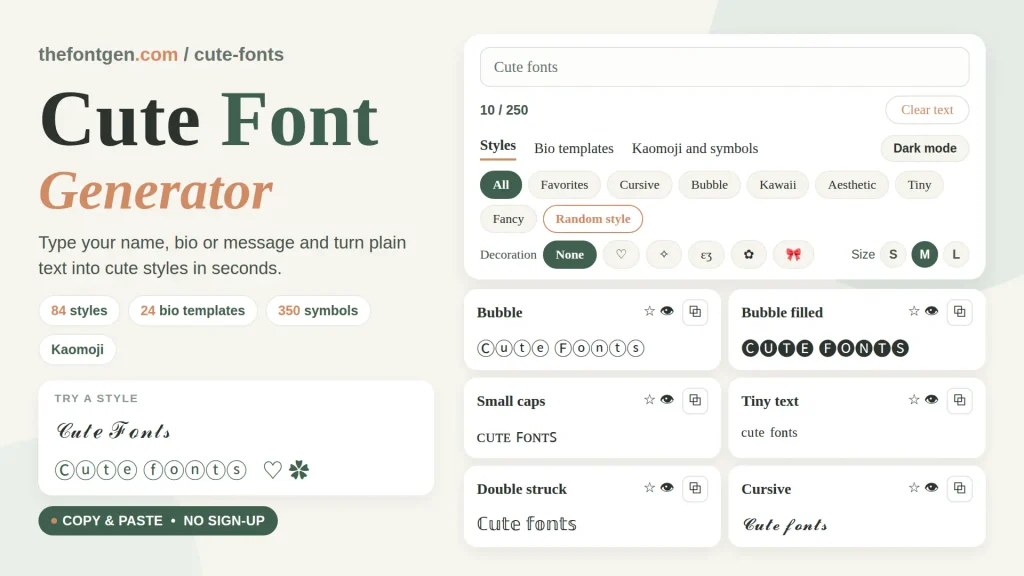
One important detail: these are copy-and-paste Unicode text styles, not traditional font files. Their appearance depends on the characters used and the app or device displaying them. Choosing a style that looks attractive and remains readable is therefore just as important as finding one you like.
What Is a Cute Font?
A cute font is a lettering style that gives text a playful, sweet, soft, or decorative appearance. Depending on the design, it may use cursive characters, rounded letters, enclosed shapes, tiny lettering, or symbols such as hearts and stars.
For example, the name Mia can be presented in several different ways:
Plain text:
Mia
Cursive:
𝓜𝓲𝓪
Bold:
𝐌𝐢𝐚
Bubble letters:
Ⓜⓘⓐ
Small caps:
ᴍɪᴀ
Decorated text:
♡ Mia ♡
These examples illustrate different text treatments. They are not all the same type of font, and not every example necessarily corresponds to an identically named preset in the tool
A cute style can make a short name feel more personal or give a social media bio a distinctive appearance. The right choice depends on your intended look. Cursive lettering can feel soft and elegant, bubble characters can look playful, and decorative symbols can add personality without changing the spelling of your words.
The goal is to make the text visually interesting while keeping its meaning clear.
How to Use Our Cute Font Generator
The tool gives you several ways to explore and customize your text. Follow these steps to find, preview, and copy a suitable style.
Enter your text
Type or paste your name, nickname, word, or short phrase into the input box at the top of the tool.
The input accepts up to 250 characters. A counter shows how much text you have entered. If you want to start again, select Clear Text to empty the input.
For the best starting point, try a short example such as Mia, Sweet Dreams, or Good Vibes.
Browse the generated styles
Open the Styles section to explore the available text variations. The tool produces different combinations of Unicode letters, characters, and decorative elements.
You can compare styles such as Cursive, Bold Cursive, Old English, Double Struck, Bubble Letters, Sans, Monospace, and Tiny Text.
The exact appearance depends on the characters supported by each style. Some variations change the letters themselves, while others combine multiple styles or add decorations.
Use the style filters
Instead of reviewing every result, select a filter that matches the appearance you want.
All: Browse the available styles
Favorites: View styles you have saved.
Cursive: Explore script-like lettering
Bubble: Find enclosed and bubble-style characters.
Kawaii: Browse playful styles and decorated combinations.
Aesthetic: Explore bold, italic, sans, and other visual treatments
Tiny: Find compact or raised characters.
Fancy: Explore decorative and distinctive lettering.
These filters help narrow the results by style category. A filter may include mixed designs that combine more than one visual effect.
Add decorations
Use the Decoration controls to experiment with additional visual elements. Depending on the selected option, a style may include hearts, stars, borders, or other decorative marks.
For example, you might prefer a simple cursive name for a clean profile or a name surrounded by symbols for a more playful look.
Keep decorations proportional to the text. A few symbols can frame a name, while too many may make it harder to read.
Adjust the preview size
The tool provides three preview sizes: S, M, and L.
Change the size to see how the selected text looks at different scales. This is useful when comparing compact lettering with larger decorative styles.
Remember that this control changes the preview size in the tool. It does not install a font or guarantee that the receiving app will display the copied text at the same size.
Try Random Style
If you do not have a particular design in mind, select Random Style.
The tool can generate a different combination for you to explore. This is useful when you want a less predictable look or need ideas for a nickname, profile name, or short phrase.
You can continue comparing results until you find one that suits your purpose
Save your favorite designs
Use the star control on a style card to add it to Favorites. You can then open the Favorites filter to review the designs you have saved.
This is especially useful when you are comparing several versions of the same name and do not want to lose the options you prefer.
Copy and paste your text
Select the Copy control on the style you want to use. The tool displays a confirmation when copying succeeds.
Next, open the app or text field where you want to use the result and paste it. Check the final appearance before saving your profile or publishing your message.
You can also open the available preview to compare the text in Instagram, WhatsApp, and TikTok-style layouts. The preview helps you assess the look, but it does not guarantee identical rendering in the actual app.
Explore more styles and text tools
Select Load More Styles when you want additional combinations. You can continue exploring new options instead of limiting yourself to the first group of results.
The tool also includes two other useful sections: Bio Templates and Kaomoji and Symbols. These are helpful when you want a ready-made profile layout or a decorative expression rather than another letter style.
Popular Cute Font Styles to Try
Cute lettering can take many forms. The following examples explain what different styles look like and when they may be useful.
1. Cute cursive fonts
Cursive lettering uses script-like characters to create a flowing appearance.
Example: 𝓢𝓸𝓹𝓱𝓲𝓪
This style can suit names, short headings, and informal messages. It is a good option when you want a soft or elegant look without adding many extra symbols.
Some cursive Unicode alphabets have gaps in their character coverage, particularly for digits or less common letters. Check the complete result before using a name or phrase.
2. Bubble letters
Bubble-style characters use enclosed shapes to create a playful appearance.
Example: Ⓢⓦⓔⓔⓣ
Bubble lettering can work well for short names, nicknames, and decorative labels. However, enclosed characters may look crowded in longer text, so test the full phrase before copying it.
3. Tiny text
Tiny text uses smaller-looking Unicode characters, including superscript forms and small-cap-like letters.
Example: ᵗⁱⁿʸ ᵗᵉˣᵗ
This style can add a subtle visual difference to a short phrase. Its small appearance can also reduce readability, especially on mobile screens, so avoid using it for important information.
4. Bold and aesthetic lettering
Bold and other aesthetic styles give words a stronger or more distinctive appearance.
Examples:
- Bold: 𝐒𝐰𝐞𝐞𝐭
- Bold cursive: 𝓢𝔀𝓮𝓮𝓽
- Double struck: 𝕊𝕨𝕖𝕖𝕥
- Monospace: 𝚂𝚠𝚎𝚎𝚝
These styles can help a short name or phrase stand out from surrounding plain text. They are not interchangeable with ordinary formatting controls, because the output contains different Unicode characters.
5. Decorated cute text
Decorated styles combine lettering with symbols or surrounding designs.
Examples:
- ♡ Sweet ♡
- ✧ Sweet ✧
- ⋆。°✩ Sweet ✩°。⋆
The symbols shown here are illustrative examples. Explore the tool’s Decoration controls to find combinations that suit your preferred appearance.
Decorated text works best when the symbols support the words instead of competing with them.
Cute Fonts vs Pretty Fonts
Cute fonts
♡ 𝓜𝓲𝓪 ♡
Pretty fonts
𝓜𝓲𝓪
People often use the terms cute fonts and pretty fonts to describe similar styles, but they can suggest different visual preferences.
Cute styles often emphasize playful shapes, rounded letters, small characters, hearts, and cheerful decorations. Pretty styles may lean toward elegant cursive, delicate lettering, or a cleaner aesthetic
For example, ♡ 𝓜𝓲𝓪 ♡ has a playful decorative feel, while 𝓜𝓲𝓪 keeps the focus on the lettering.
There is no strict technical boundary between the two terms. Both can describe decorative text styles, and a single design may fit both categories.
If you want a subtle result, try cursive or a simple aesthetic style. If you prefer something more expressive, explore bubble characters, kawaii combinations, and decorations.
How Cute Text Works: Unicode Characters Explained
A copy-and-paste cute font generator works differently from software that installs or loads a traditional typeface.
Unicode is a standard that assigns code points to characters used by many writing systems and symbol collections. Some Unicode blocks contain mathematical letters and other characters that resemble bold, italic, script, double-struck, or enclosed lettering.
A generator can map ordinary letters to these characters, combine multiple styles, or add decorative symbols. The same mapping idea powers other effects too, like upside down text, where each letter is swapped for a character that looks flipped. When you copy the result, you are copying the generated characters rather than changing the font setting on your device.
For example:
- Original text: Hello
- Stylized text: 𝓗𝓮𝓵𝓵𝓸
The second version uses different Unicode characters from the ordinary spelling. It may look like cursive lettering, but it is not simply the original word displayed in a different installed font.
This distinction explains several important limitations
The style travels with the copied characters.
You do not need to install a typeface just to paste supported Unicode text into another field.
Appearance depends on character support.
The receiving app, operating system, and font must be able to display the characters. Some may appear differently or be missing entirely.
It is not a replacement for design software.
If you need precise typography for a poster, logo, print project, or professional graphic, a real font file used in suitable design software may be more appropriate.
A copy-and-paste generator is useful for quick text styling. A downloadable typeface offers a different level of control for design work.
Use Bio Templates, Kaomoji, and Symbols
Cute text does not always require changing every letter. Sometimes a ready-made layout or a small decorative expression is more useful.
Bio templates
Open the Bio Templates section to explore prepared profile-style layouts. These templates provide a starting point for arranging text and decorations.
Choose a layout that suits the message you want to share. Before copying it into a social profile, review the result and replace or edit any example text as needed.
A template can help you organize a short profile, but the best bio still communicates something meaningful about you.
The same idea works for seasonal profiles, which is why christmas fonts copy and paste styles get so much use in December bios and holiday greetings.
Kaomoji
Kaomoji are text-based expressions made from characters and symbols. They can communicate a mood or reaction without relying on a conventional emoji.
Examples include:
- (◕‿◕✿)
- ʕ•ᴥ•ʔ
- (≧◡≦)
- (˶ᵔ ᵕ ᵔ˶)
- ꒰ᐢ. .ᐢ꒱
Use the Kaomoji and Symbols section to browse the available expressions. Select an item to copy it, then paste it into a compatible text field.
These expressions can suit casual messages, captions, and personal profiles. Some are wider than ordinary text, so check the result before using one in a short username or restricted field.
Decorative symbols
Symbols such as hearts, stars, and floral marks can add a finishing touch to a name or phrase.
For example:
♡ 𝓢𝓸𝓯𝓲𝓪 ♡
The symbols do not change the underlying spelling of the name, but they can alter its visual presentation. Use a few well-chosen marks rather than adding so many that the text becomes difficult to scan.
Where to Use Cute Text
Cute text can be useful in informal digital communication, particularly when you want a name or short phrase to feel more personal.
Instagram bios and profile names
A cursive name, a few decorative symbols, or a simple aesthetic style can give a profile a distinctive look.
Example:
୨୧ 𝓢𝓸𝓯𝓲𝓪 ୨୧
You can keep the decorative style for your name and use ordinary text for the rest of your bio. This makes the profile easier to scan and keeps important information readable.
Remember that a stylized Unicode name may not match searches for its ordinary spelling in the same way. Keep essential keywords and contact details in plain text where possible.
WhatsApp messages
A small decorative phrase or a cute name can add personality to a casual message.
Example:
♡ Thank you, friend! ♡
You can also try a Unicode style for a short greeting or nickname. For a longer conversation, ordinary text is usually easier to read.
The tool’s WhatsApp-style preview can help you compare a result before copying it, but the final rendering should always be checked in WhatsApp itself.
TikTok profiles and captions
Cute text can help create a consistent visual style for a display name or short profile description.
Example:
✧ 𝓢𝔀𝓮𝓮𝓽 𝓥𝓲𝓫𝓮𝓼 ✧
Different profile fields may have different character restrictions. A display name may accept characters that an account handle does not, so test the result in the exact field where you plan to use it.
Facebook and other social platforms
You can try decorative text in supported profile fields, posts, or informal messages. The suitability of a style depends on the destination and the purpose of the content.
Keep important details readable, particularly when the text communicates instructions, contact information, or something people need to search for.
Gaming names and online communities
A distinctive nickname can help express your personal style in a gaming profile or online community. However, many services restrict which characters can be used in account names or IDs.
Try a simple style first. If the platform rejects the result, return to ordinary text or choose a variation with more widely supported characters.
How to Choose a Cute Font That Is Easy to Read
A decorative style should improve the appearance of your text without making it difficult to understand.
Use these practical guidelines when comparing styles:
Match the style to the purpose.Cursive can suit a name, while a simpler style may be better for a longer caption.
Keep decorations under control.A few symbols can frame a word. Too many can make the result cluttered.
Check the full phrase.Some styles handle individual letters differently, so a short sample may not reveal every limitation
Consider the screen size.Tiny characters and elaborate symbols can be harder to read on a phone.
Keep essential information plain.Links, account handles, instructions, and contact details should remain easy to understand.
Preview the actual result.Use the available preview as a guide, then test the copied text in the destination app.
Think about accessibility.Some screen readers may announce stylized Unicode characters in unexpected ways. Ordinary text is generally safer for essential information.
For most personal profiles, a simple approach works well: style your name or a short phrase, then keep the supporting text readable.
Why Some Cute Fonts Do Not Display Correctly
If copied text appears as empty boxes, missing symbols, or unexpected characters, the issue may be related to Unicode support rather than the generator itself.
The receiving device, application, or font may not contain a glyph for every character. Some platforms also restrict special characters in specific fields.
Try these troubleshooting steps:
Choose a simpler style.
Try a basic cursive, bold, or other less elaborate variation instead of a heavily decorated combination.
Remove extra symbols.
Combining marks and decorative characters can sometimes cause spacing or rendering problems. Copy the text without the extra decorations and compare the result.
Test it in the actual app.
A preview cannot guarantee how another application will render the text. Paste the result into the destination field before saving it.
Check the field restrictions.
If a platform rejects the text, the issue may be its rules for usernames, handles, or other fields rather than the characters’ visual appearance.
Keep the original spelling.
Save an ordinary text version of names and important messages so you can use it if the decorative version fails.
Consider readability and accessibility.
If the text must be understood by everyone, use plain text for essential details and reserve decorative characters for optional styling.
No single Unicode style is guaranteed to display identically across all devices and applications. Testing the final result is the most reliable way to check compatibility.
Frequently Asked Questions
Conclusion
Finding a suitable cute style is easier when you can compare several options before deciding. Start with a name or short phrase, browse the available filters, experiment with decorations, and adjust the preview size until you find a design that fits.
Save your favorite styles, try a random combination when you want a new idea, or explore the Bio Templates and Kaomoji and Symbols sections for additional ways to personalize your text.
When you are happy with the result, copy it into your intended app and check how it appears. If the style is difficult to read or does not display correctly, choose a simpler variation.
The best cute text is not necessarily the most elaborate. It is the one that expresses your style while keeping your words recognizable and useful.