
Fancy Fonts Generator: Copy and Paste Cool Fancy Text
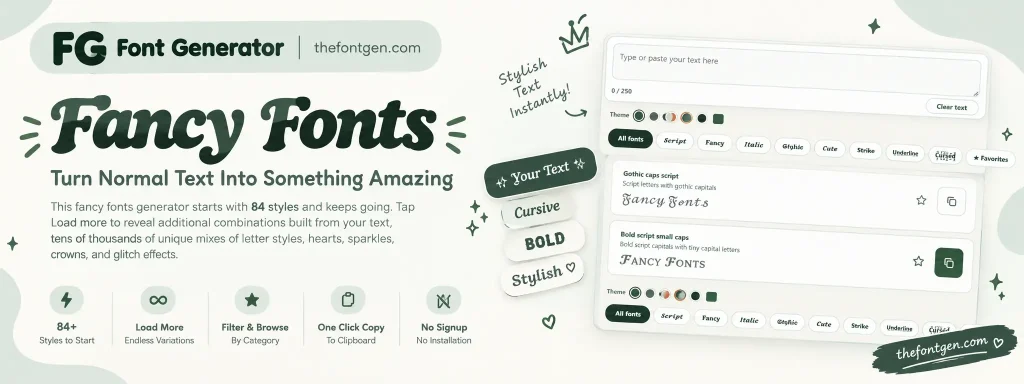
This fancy fonts generator starts with 84 styles and keeps going. Tap Load more to reveal additional combinations built from your text, tens of thousands of unique mixes of letter styles, hearts, sparkles, crowns, and glitch effects. Use the filter pills to browse categories, star your favorites, and copy any style straight to your clipboard. It is free, needs no signup, and works right in your browser.
What Is a Fancy Fonts Generator?
A fancy fonts generator is an online tool that turns your normal text into stylish decorative letters. You type a word like hello and it instantly shows versions like 𝒽ℯ𝓁𝓁ℴ, 𝐡𝐞𝐥𝐥𝐨, and hello. These are called fancy letters, and you can copy any style and paste it in most apps you use every day.
The trick behind it is Unicode. Unicode is a standard list of characters that most phones and computers understand. A fancy fonts generator does not install a real font on your device. It simply swaps each normal letter with a matching Unicode character that looks decorative. Because the result is still plain text, many apps support Unicode-styled text without any extra steps. But character availability and appearance can vary by platform, device, and font support.
This is different from font files. A downloadable font file does not replace your text characters. Instead, it defines how those characters look when a compatible app, web page, or document uses that font. Unicode styled text is the opposite. The style lives inside the characters themselves, so it usually travels with your message to any phone or computer. That is why you can paste it into Instagram or WhatsApp and your friends receive the same characters, though the exact look can vary by device.
Our cool font generator keeps things simple. It is a font generator for fancy text that works right in your browser. There is nothing to download and no account needed. You type, you pick a style, and you copy the result.
How to Use the Fancy Fonts Generator
Type your text
Type or paste your text in the box at the top of the tool. You can write your name, a short bio line, or any message. The box counts your characters up to 250, so you always know how much space you have left. This makes it useful for names and short messages.
Pick a style
As you type, the tool shows your text in 84 styles at once. Each style shows its name and a short description, so the names of the font styles are always clear. Use the filter pills at the top to narrow things down. You can pick Script, Bold, Italic, Stylish, Cute, Fancy, Strike, Underline, or Cursed. There is also a Favorites pill where your saved styles live.
Copy, then paste it yourself
Copying and pasting fancy letters is simple. Tap the copy button on any style card and your chosen style is copied straight to your clipboard. A small toast message confirms the copy worked. If your browser blocks automatic copying, the tool tells you to select the text and copy it manually, so you are never stuck. One thing to know: the tool copies the text, it does not paste it for you. Open the app where you want the text, tap the text field, and paste it yourself.
Save favorites and change the theme
Tap the star on any style to save it to your favorites. Your favorites stay saved in your browser for your next visit. You can also change the theme color of the tool with the color dots, or pick your own custom color.
Popular Fancy Fonts Styles to Try
This generator gives you different types of font styles in one place. Here are the main letter styles and what each one is good for. Type hello once and compare how the same word changes: script 𝒽ℯ𝓁𝓁ℴ, bold 𝐡𝐞𝐥𝐥𝐨, fraktur 𝔥𝔢𝔩𝔩𝔬, monospace 𝚑𝚎𝚕𝚕𝚘, fullwidth hello. Same word, five different personalities
Script looks like elegant handwriting. Type King and you get 𝒦𝒾𝓃ℊ, a natural pick for bios and display names. Our cursive font page has more handwritten options.
Bold makes words heavy and easy to scan. Fancy becomes 𝐅𝐚𝐧𝐜𝐲, which works for headings and short announcements. Our bold font generator focuses only on bold looks.
Italic slants letters softly. Fancy becomes 𝐹𝑎𝑛𝑐𝑦, which suits quotes and gentle emphasis.
Fraktur gives a gothic feel, like 𝔉𝔞𝔫𝔠𝔶, used by some for tattoo lettering ideas. More dark lettering is on our tattoo fonts page.
Fancy alphabet letters also include fun shapes like circled Ⓕⓐⓝⓒⓨ and small caps ʜᴇʟʟᴏ. Cursed styles add glitchy marks above and below your letters. This freaky font look suits memes and horror posts in small doses, since heavy glitch text is hard to read.
Fancy Text With Symbols and Decorations
Plain styled letters are only half the fun. This tool also wraps your words in decorative text combinations made of symbols. These cute writing fonts turn a simple word into a decoration.
Type love and add hearts to get ♡ 𝓁ℴ𝓋ℯ ♡. Add sparkles for ✧ 𝓁ℴ𝓋ℯ ✧. There are 16 cute wraps like flowers ❀, ribbons 🎀, moons ☾, and wings ʚ ɞ, plus 12 fancy wraps like crowns ♛, diamonds ◆, and curly brackets ꧁ ꧂.
You can also put symbols between every letter. The word Bio becomes B♡i♡o with hearts between letters, or B✧i✧o with sparkles. For more soft and sweet lettering ideas, visit our cute text page.
To see even more mixes, tap Load more. Each tap adds 12 new styles, and the tool can build tens of thousands of unique mixes by combining base fonts with decorations. You will have plenty of different fonts to try.
Match a Style to Your Mood
Pick a style that matches the feeling you want. For a classy font feel, choose Script or italic. Script letters make beautiful fonts for wedding invites and elegant bios, and our calligraphy fonts page has more handwritten styles if you love this look. For a bold and confident mood, pick bold serif or double struck, like the gaming tag 𝐆𝐚𝐦𝐞𝐫. For a playful mood, try circled letters or fullwidth. For a cute mood, combine a soft style with symbol wraps, like ✧ 𝓁ℴ𝓋ℯ ✧. For an edgy mood, fraktur or cursed styles work well in short bursts.
Where to Use Fancy Fonts
Because fancy fonts are plain Unicode text, you can paste them in most places that accept text. Instagram supports fancy fonts in bios, captions, and comments. For more bio focused styles, check our instagram fonts page.
TikTok captions and display names also support fancy text, and a stylish display name helps your profile stand out in comments. Discord usernames, messages, and channel names accept Unicode styles, and many gamers use fancy fonts for their Discord names and Steam profiles. Many games display simple Unicode styles like bold and small caps, but each game has its own rules and some block decorative symbols, so test your name in the game before you settle on it.
WhatsApp and Telegram messages can carry styled text too, and a birthday wish in script letters feels more special than plain text. YouTube video titles and descriptions stand out with a bold or decorative word at the start, as long as the title stays readable. Email signatures are another quiet spot. A small styled name at the end of your emails looks polished without being loud
One honest note: some Unicode characters may not display as expected in Facebook text fields. If a style looks incorrect, try a simpler alternative
Fixing Common Problems
You see boxes instead of letters
This means the app or device does not recognize a certain Unicode character. Go back to the generator and pick a simpler style. Bold, italic, and monospace Unicode styles tend to have the widest support across phones and computers. If it matters, test the style on the device your audience uses most.
Only some letters look wrong
The style may be missing those exact characters. Numbers and symbols often stay close to normal in decorative styles. Try a different style from the same family before you give up on the look.
A username field rejects your text
Some platforms and games block symbols or limit which characters names can use. Switch to a letters only style like bold, italic, or script, and keep the name short. Then try again.
Copy does not work
Tap the copy button once more. If your browser blocks it, select the styled text with your finger or mouse and copy it manually. On phones, a long press on the text usually opens the copy option.
Styles can also look slightly different on iPhone and Android. The character is the same, but each phone draws it with its own system font. This is normal.
Tips for the Best Results
Keep your text short. Fancy letters are often wider than normal letters, so long sentences can wrap in odd ways on small screens. Short names and phrases look best.
Mix styles instead of styling everything. Make one or two words fancy and keep the rest normal. This draws the eye to what matters.
Preview before you post. Paste your styled text into the app first and look at it on your own screen. A style that looks great in the generator can feel different inside a busy chat or a small bio box.
Frequently Asked Questions
Conclusion
A fancy fonts generator makes it easy to turn ordinary text into stylish letters, decorative symbols, and creative combinations. With our free fancy fonts generator, you can explore 84 ready-made styles, discover more combinations with the Load More button, save your favorite designs, and copy your preferred text in seconds. Use these fancy fonts for Instagram bios, TikTok captions, WhatsApp messages, Discord usernames, and more. No downloads or sign-up are required. Try different font styles, preview them before posting, and choose the one that matches your personality while keeping your text easy to read.