Tap the star on any face to save it here.
Lenny Faces Generator: Copy and Paste Text Faces for Every Mood
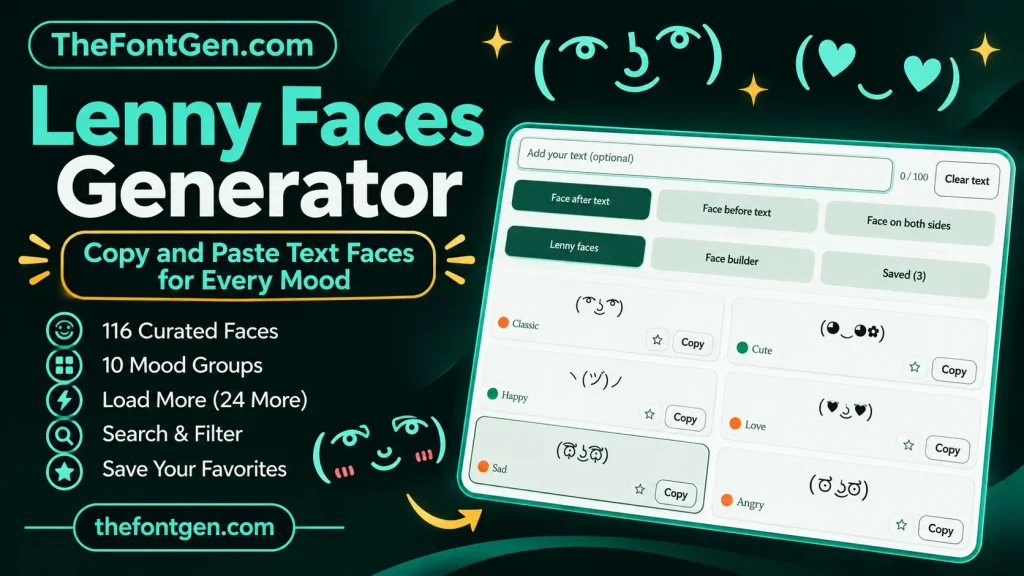
This lenny faces generator starts with 116 curated faces sorted into 10 mood groups, and the first view shows 84 cards ready to copy. Keep pressing Load more and the tool builds fresh combinations past the curated set, adding 24 cards at a time, so the grid keeps growing instead of running out. Every face is plain Unicode text, which means it pastes into chats, comments and bios where text is accepted.
You can type up to 100 characters of your own text and place a face before it, after it or on both sides, then copy the finished line with one tap. A face builder with 18 eye pairs, 16 mouths and 14 pose wraps lets you build a face of your own, while a mood search, a safe faces filter and a saved collection keep your favourite lenny faces close. A face such as ( ͡° ͜ʖ ͡°) typed after a short line can turn a plain message into a joke without one extra word.
What Are Lenny Faces
Lenny faces are text faces built from Unicode characters instead of pictures. The classic face ( ͡° ͜ʖ ͡°) is the best known example, and it carries a knowing smirk that people read as playful, sly or teasing. Because the face is plain text, you can copy it and paste it into chats, comments, bios and posts where text is accepted.
A single face can change the tone of a whole message. The same line can sound flat on its own and sound like a joke once a face is added at the end. That is why lenny faces are still shared in gaming chats, group chats and comment threads many years after the classic face first appeared.
The classic face and what it means
The classic face usually means that the writer knows something, hints at something or is joking in a cheeky way. Readers often take it as a raised eyebrow with a smirk, so it works well after a playful remark or a gentle tease. For example, a message like we both know how that story ends ( ͡° ͜ʖ ͡°) needs no extra words to land the joke.
Context decides the exact shade of meaning. Between close friends the face reads as light fun, while in a serious thread it can read as mocking or suggestive. If the reader may not share the joke, a softer choice from the cute or happy lenny faces is usually the safer pick.
The Unicode parts inside the classic face
The classic face looks simple, but its parts come from different corners of Unicode. The two eyes are degree signs (U+00B0), the curved mark above them is the combining double inverted breve (U+0361), the mark below is the combining double breve below (U+035C), and the middle character ʖ is the Latin letter inverted glottal stop (U+0296). The brackets at both ends hold the whole face together like the outline of a head.
Combining marks are the secret behind the raised eyebrows and the curved mouth. A combining mark attaches to the character before it instead of taking its own space, which is why the small arcs sit neatly above the eyes and below the middle of the face. This tool marks faces that use such marks with an orange dot, because apps and fonts may place those marks in a slightly different position.
Lenny face, kaomoji, dongers and emoji explained
These terms overlap and many pages mix them up, so here is the short version. A kaomoji is a Japanese style text face that you read upright, such as (◕‿◕✿), and kaomoji covers a very wide family of expressions, having come after the older sideways emoticons of the west, such as :), which you read by tilting your head. Lenny faces grew out of that same text face culture, but they centre on the classic smirk and its close variations.
Dongers are a louder branch of text faces with raised arms and excited energy, such as ヽ༼ຈل͜ຈ༽ノ This tool keeps dongers in their own group labelled Dongers, so you can find them without digging through calmer faces. Emoji are different from all of these, because an emoji is a single picture character rather than a face built from several text characters, while flipped writing from a flipped letter text tool turns your words instead of adding an expression.
How to Use This Lenny Faces Generator
The generator sits at the top of this page and needs no account and no install. You can use it in two ways, by picking a ready face from the lenny faces grid or by building your own in the Face builder tab. The steps below follow the ready faces first, because that is the path most visitors use.
Add your text if you want a face with words
Type or paste your short text in the box at the top of the tool. The box accepts up to 100 characters, and the counter beside it shows how many characters you have used. This step is optional, and you can leave the box empty when you only want the face on its own.
For example, you could type the words game night at my place and let the tool attach a face to that line. Every card in the grid then shows your text together with its face, so you preview the final message before you copy anything. The Clear text button removes your words at once when you want to start again.
Choose where the face sits
Three buttons under the text box control the position of the face. Face after text places the face at the end of your words, Face before text places it at the start, and Face on both sides wraps your words with the same face twice. The grid updates at once, so you can compare the three looks without copying anything first.
Position changes the feel of a message more than most people expect. A face at the end usually feels like a reaction, while a face at the start feels like an announcement. Trying both sides takes one tap, so it is worth a quick look before you settle on a card.
Pick a mood group or search for one
The pill row under the search box lists All plus the 10 mood groups that organise these lenny faces. Tap a group such as Cute, Sad or Angry and the grid shows only faces from that group. You can also type a mood word in the search box, and words such as cute, sad, cat, happy and shrug are understood by the search.
Search is the faster route when you already know the feeling you want. The group pills are better when you want to browse and compare several faces with a similar mood side by side. Either way, the view resets when you change group or search, so you always start from the first set of cards.
Tap a card to copy the face
Tap or click any card and the tool copies the face together with your text in the position you chose. A small Copied message appears at the bottom of the screen to confirm the copy worked. You can also press the Copy button on the card itself, or use the Enter key or the Space key when a card is selected on a keyboard.
After copying, paste the result into your chat or post in the usual way for your device. On a computer that usually means the Control key with the V key, and on a phone it usually means a long press followed by Paste. The whole result travels as one piece of text, so the spacing stays together and the marks travel with the face, even though every app draws those marks in its own way.
Save the faces you like and copy them all
Tap the star on any card and that face moves into your saved collection of lenny faces under the Saved tab. Saved faces stay in your browser on this device, so you can close the page and find them again later. This works well for a small set of faces that you reach for again and again.
The Saved tab also has a Copy all button that copies your whole saved set in one go, with each face on its own line and with your current text and position applied to each face when the text box has words in it. That is handy when you want to move your set into a notes app or share it with a friend, so clear the text box first when you want the plain faces on their own. The Clear all button empties the collection when you want a fresh start.
Lenny Faces by Mood: The 10 Groups in This Tool
Sorting by mood is the heart of this tool, because most people arrive with a feeling in mind and search lenny faces by that mood rather than by a specific face. Each group below follows the exact groups inside the tool, and the examples are taken from the tool itself. Reading the short note under each group will help you pick the right tone before you copy.
Classic lenny faces
The Classic group holds 20 faces built around the original smirk and its closest variations. You will find the plain classic ( ͡° ͜ʖ ͡°), the winking version ( ͡~ ͜ʖ ͡°) and even a face inside a face in ( ͡°( ͡° ͜ʖ( ͡° ͜ʖ ͡°)ʖ ͡°) ͡°). This is the group to open when you want the recognised meme look that most readers will understand at once.
Classic faces suit jokes, hints and light teasing between people who know the meme. They also work as a safe first choice when you are new to lenny faces and want the most familiar options. Start with these classic lenny faces, and move to other groups only when you need a stronger or softer mood.
Cute lenny faces
The Cute group holds 16 soft faces with round eyes, flowers and gentle smiles. Good examples are (◕‿◕✿), (。◕‿◕。), the hugging face (づ。◕‿‿◕。)づ and the shy blushing face (⁄ ⁄•⁄ω⁄•⁄ ⁄) for a bashful moment. These faces borrow the sweet look of kawaii style kaomoji, so they feel warm rather than cheeky.
Use cute faces for greetings, thanks, encouragement and friendly replies. A line such as thank you for the help (づ。◕‿‿◕。)づ feels like a small hug in text form. They are also a kind choice for readers who may find the classic smirk too teasing, and sweet kawaii style text in the words beside them keeps the same soft tone.
Happy lenny faces
The Happy group holds 10 bright faces full of energy and celebration. You will see raised arms and wide smiles in ╰(°▽°)╯, ٩(^ᴗ^)۶ and ヽ(•‿•)ノ.
These faces say joy out loud instead of hinting at it.
Happy lenny faces fit wins, good news, birthdays and Friday messages. They also work well in gaming chats after a hard match finally goes your way. If a message should feel like cheering, this group usually has the right face for it.
Love lenny faces
Hearts run through all 10 faces in the Love group, together with soft smiles. The group includes ( ͡♥ ͜ʖ ͡♥), the simple heart face ♥‿♥ and the wide heart eyed smile (。♥‿♥。). These faces mix the Lenny charm with clear affection.
Use love faces with partners, close friends and family members who will read the hearts in a warm way. They can also soften a compliment or a thank you note, and smooth script lettering styles in the words can make a short love note feel handwritten. Save strong heart faces for people you know well, because the same face can feel too forward with a new contact.
Sad lenny faces
Tears, drooping mouths and tired eyes fill the 11 faces in the Sad group. You will find ( ͡ಥ ͜ʖ ͡ಥ), the plain crying pair ಥ_ಥ and the small tearful face (╥﹏╥). These faces express disappointment or mock sadness in a way that plain words often cannot.
Sad lenny faces work after a cancelled plan, a lost game or a small everyday failure. Used lightly, they ask for sympathy without a long explanation. In a truly serious moment a written sentence is still kinder than any face, so read the room first.
Angry lenny faces
The Angry group holds 12 faces with hard stares, clenched energy and flying tables. Strong examples are ಠ_ಠ for disapproval, (╬ಠ益ಠ) for rage and (ノಠ益ಠ)ノ彡┻━┻ for the full table flip moment. The famous plain table flip (╯°□°)╯︵ ┻━┻ also lives in this group, together with its polite partner ┬─┬ノ(ಠ_ಠノ), the face that puts the table back.
Most people use angry lenny faces as comedy rather than real anger. They fit game defeats, annoying bugs, playful complaints in a group chat and the sarcastic solidarity of a hard study or work day. With people you know less well, the disapproval stare ಠ_ಠ is usually enough and the table flip may be too much.
Cool lenny faces
Sunglasses, money signs and flexed arms give the 9 faces in the Cool group their confident look. You can copy (⌐■_■) for the plain shades look, (▀̿Ĺ̯▀̿ ̿) for a heavier stare and ᕦ( ͡° ͜ʖ ͡°)ᕤ for a confident flex. The money face [̲̲̅̅(̲̅͡°͜ʖ͡°̲̅)̲̲̅̅] completes the set, with its dollar signs wrapped around the classic smirk.
Cool faces follow a win, a sharp reply or a job done well. They say confidence without a long boast, which is why gamers and streamers reach for them so often. One cool face at the end of a short line usually lands better than a row of them, and strong heavy text styles in that line can complete the confident look.
Shrug lenny faces
The Shrug group holds 8 faces built on the famous shrug gesture. The plain form ¯_(ツ)/¯ is one of the most copied text faces on the internet, and the group also holds the Lenny version ¯_( ͡° ͜ʖ ͡°)/¯. Both say the same thing in slightly different voices, which is part of their charm.
A shrug face means I do not know, I cannot change it or it is not my call. It softens a no answer and fills an awkward pause in a chat. Because the meaning is so widely known, shrug faces work even with readers who have never used lenny faces before.
Dongers
The tool labels this group Dongers, which is the name meme culture uses for this loud family of faces. The group holds 10 raised arm faces such as ヽ༼ຈل͜ຈ༽ノ, the pointing pair (☞ ͡° ͜ʖ ͡°)☞ and the grabbing hands of ༼ つ ◕_◕ ༽つ. These are the loudest faces in the whole collection.
Dongers suit hype moments, silly demands and chaotic group chat energy. The classic use is a playful call such as raise your dongers before a stream or a match. These funny faces are meant to be over the top, so save them for crowds that enjoy that style of humour.
Animal lenny faces
The Animal group holds 10 faces for bears, cats and dogs. The bear ʕ•ᴥ•ʔ is the star of the group, and you will also find the cat paw face ฅ^•ﻌ•^ฅ and the cat face (=^・ω・^=). The Lenny bear ʕ ͡° ͜ʖ ͡°ʔ mixes the classic smirk with the bear shape.
Animal lenny faces are a gentle way to join pet talk, animal posts and cute threads. They also suit usernames and short bios for people who want a soft identity mark. If you mostly need pet expressions, the search word cat will take you straight to this corner of the tool.
Face Builder: Make Your Own Lenny Face
Ready lenny faces cover most needs, but sometimes you want a face that nobody else is using. The Face builder tab lets you assemble your own face part by part and watch the preview change as you tap. Your built face can use your short text and position choice from the top bar, just like a ready card.
Eyes, mouth and pose choices
The builder gives you 18 eye pairs, 16 mouths and 14 arm and pose wraps to combine, and picking the classic degree eyes with the ʖ mouth rebuilds the classic face ( ͡° ͜ʖ ͡°) itself. Eye choices range from the classic degree pair to hearts, sparkles and the hard ಠ stare. Mouth choices include the classic ʖ curve along with smile arcs, a flat line and the small triangle ▽.
The pose wraps decide what the face is doing with its body. You can keep the plain brackets, or choose wraps named Fight, Flex, Run, Cheer, Hug, Point, Magic, Sparkle, Shrug, Table flip, Hands up, Stage and Dance. Changing only the wrap can turn a calm face into a celebration or a challenge.
Lenny style and simple style
Two style buttons sit under the pose choices. Lenny style adds the combining marks that give the face its raised brows and curved mouth, while Simple style leaves those marks out for a cleaner and plainer face. Simple style faces have fewer marks that can go wrong, though no style can promise the same result in every older app.
A Repeat choice lets you show your built face one time, two times or three times in a row. A repeated face works well as a chant in a gaming chat or as a playful divider in a post. Keep repeats for fun spaces, because a triple face in a serious thread can look like shouting.
Random, copy and save in the builder
The Random face button picks an eye pair, a mouth and a wrap for you when you cannot decide. It is a fast way to discover combinations you would never tap through one by one. When a random result makes you smile, that is usually the right face for your message.
The Copy face button copies your built face with your text in your chosen position. The Save face button places it in the same saved collection as the ready cards, so your own creations and your favourite ready lenny faces live in one place. From the Saved tab you can then copy your whole set at once.
Where to Use Lenny Faces
Text faces travel well because they need no image file and no special app. Most modern phones and computers display the common lenny faces without trouble, though the section on broken looking faces below explains the few exceptions. The best places to use lenny faces are the places where tone matters and words alone feel thin.
Chats and messaging apps
In one to one chats and group chats, a face at the end of a line can carry the joke or the feeling for you. WhatsApp, Telegram and plain text messages all accept pasted text faces, and the classic faces usually arrive as copied. Try a line such as see you at eight, do not be late this time ( ͡~ ͜ʖ ͡°) and notice how the wink changes the warning into teasing.
Faces also help when a short reply could sound cold. A plain okay can read as annoyed, while okay (◕‿◕✿) reads as cheerful and willing. Many people keep two or three saved lenny faces for exactly these small tone repairs.
Discord, Twitch and gaming chats
Gaming culture kept the classic face alive, and it still appears in Discord servers and Twitch chat every day. Players drop the smirk after a lucky play, use dongers for hype and send the table flip after a painful loss. Fast chats reward faces that readers can grasp in a second, and the classic smirk is one of the fastest reads of all.
Server rules still come first, and some communities limit spammy faces during streams or events. One well timed face usually earns more laughs than a block of ten. If you play with the same group often, your saved set can become part of your chat identity, and a stream title dressed up with video name styling ideas can carry the same joke onto your channel page.
One Markdown quirk is worth knowing for shrug faces. On Reddit and in Discord, the backslash in ¯_(ツ)_/¯ can be swallowed by Markdown, so the shrug can lose its shape unless you add extra backslashes before you post. Faces without a backslash, including the classic smirk, are not affected by this.
Social posts, comments and bios
On Reddit, X, Instagram and similar platforms, a text face can make a caption or comment feel personal without adding an image. People also place a small face in a display name or bio line to give a profile a recognisable mark. A bear such as ʕ•ᴥ•ʔ in a bio says friendly and playful before a single post is read.
Pairing a face with styled words can make a profile line even more personal. You can style the words first, using decorative lettering ideas for captions, and then place your chosen face beside them. Keep the total line short, because long lines with many symbols are hard to read on small screens.
Names and usernames that need care
Some name fields and username fields remove combining marks when you save them. The face may then lose its brows and mouth and come out as a plain pair of eyes, which looks broken rather than clever. This is a limit of the field itself and not a fault in the face you copied.
For names and game tags, test lenny faces in a note first and prefer faces without an orange dot when the platform is strict. The Safe faces only filter in this tool was made for this job, and it is explained in the next sections. A simple bear or cat face often survives in a name field where a full classic face may not.
The Story Behind the Lenny Face
Know Your Meme, the archive that documents this meme, dates the first appearance of the classic face to 18 November 2012 on Ylilauta, a Finnish imageboard. An anonymous user posted the face in a thread, other users began making variations with different eyes, and the thread filled with the face for days. Reports from that time say some users were even removed from boards for spamming lenny faces, which only spread the joke further.
Within days the face reached 4chan and Reddit, and from there the rest of the busy web. Its plain text form helped it travel, because anyone could copy it and paste it into a new home without saving an image. One later account of its spread counted over 150 Facebook pages with the face in the title by 29 November 2012, which shows how fast pages and groups named after the face were appearing on social networks.
Two nicknames travelled with the face. By most accounts, the name deg deg came from a speech program that read the degree sign eyes out loud in a funny way, and Le Lenny Face appeared as a playful title in early posts. Nobody knows for certain who first chose the name Lenny, and honest pages should admit that instead of inventing a person behind it.
How to Type a Lenny Face and Set a Shortcut
You cannot type the classic face with one key, because it is a short string of separate Unicode characters and some of them have no key on a normal keyboard. That is the honest reason why copy and paste became the standard way to use lenny faces. You can find guides that show how to type the face by hand with number codes, but the method is slow and easy to get wrong.
The Alt code method on Windows
Some websites list Alt codes for this face, with a number code for each part. In practice the method is unreliable, because it depends on your keyboard, your language settings and the app you type into, and it tends to work only in some Windows programs such as word processors. A missed or rejected code leaves a flat face with missing marks, which is why most people try it once and return to copying.
Copy and paste from the top of this page is the easiest and most reliable method for most users, because the whole face travels as one piece of text. If you use one face again and again, set it up once as a shortcut instead, using one of the methods below.
The emoji panel on Windows and the Character Viewer on Mac
On Windows 10 and 11, pressing the Windows key with the period key opens an emoji panel that also has a kaomoji section with ready text faces. The faces there are simple ones rather than the full Lenny range, but the panel works inside most apps without leaving your keyboard. On a Mac, the Character Viewer plays a similar role for single symbols, though you still assemble a full face part by part.
A shortcut on iPhone
A phone shortcut solves the repeat work after your first copy. On an iPhone, copy a face from this page, open Settings, then General, then Keyboard, then Text Replacement, tap the plus sign, paste the face as the phrase and type a short word such as lenny as the shortcut. After that, typing your shortcut word offers the full face in most apps.
A shortcut on Android with Gboard
On Android with the Gboard keyboard, copy the face and open your personal dictionary from the keyboard settings. Add the face as the word and your short word as the shortcut, then save it. Menu names can differ a little between phone brands, but the personal dictionary idea is the same on most Gboard setups.
A simple habit on a computer
On a computer, a saved collection on this page is often shortcut enough. Keep this page in a pinned tab or keep your saved faces in a notes file, and your favourite faces stay one copy away. This simple habit beats memorising character codes that you will rarely use.
Why a Face Can Look Broken and How to Fix It
A face can look slightly different from one app to another, and that is normal. Each app draws Unicode characters with its own font, so the brows may sit a little higher or the mouth may curve in a different way. The face is still the same text underneath, and readers will usually still read the expression correctly.
A face looks truly broken when an app removes combining marks or lacks the characters in its font. Then the brows can vanish, the eyes can drift or small boxes can appear in place of a part. Problems show up most in places with weak font support or strict text handling, including some older apps and devices, strict name fields and the text overlays inside Stories and TikTok videos.
This tool helps you choose with two aids. The dot on each card works as a quick guide, where a green dot marks a face built from characters that generally have broader compatibility, and an orange dot marks a face that contains combining marks, which may render differently across apps and devices.
The Safe faces only button goes further and hides every face that uses combining marks, leaving a grid of safer choices, though the final result always depends on your operating system, your font, the app and the text field you paste into.
If a pasted face breaks in your target app, copy a safe choice from the lenny faces grid and try again. A simple face such as ʕ•ᴥ•ʔ or (◕‿◕✿) carries a clear expression with common characters. Most readers will still read a slightly shifted face correctly, so save the safe faces for the fields that strip marks entirely.
Common Mistakes When Using Lenny Faces
The classic smirk has a suggestive side, and that is the first mistake to avoid. Dropping it into a work channel, a formal mail or a message to a senior person can read as flirting or mocking rather than fun. When the setting is professional, leave lenny faces out and let clear words do the work.
The second mistake is using too many faces in one message. A wall of faces looks like spam, tires the reader and weakens the one joke you wanted to land. One face per short message is a good working rule for most chats, with a second face saved for a real punchline.
The third mistake is trying to type the classic face by hand from memory. The combining marks are easy to miss, and a face typed as plain brackets and degree signs comes out flat and wrong. Copying from a card takes one tap and keeps every mark in its right place.
The fourth mistake is pasting a mark heavy choice from the lenny faces collection into a field that strips marks and then blaming the tool. Username fields, some game tags and some form fields clean the text as you save it. Use the safe filter for those places, or place your face in the message body where full text is welcome.
Tips for Choosing the Right Face
Match the face to the feeling first and to the look second. If you want to tease, start in Classic, if you want to comfort, start in Cute or Love, and if you want to celebrate, start in Happy. This mood first habit is why the tool groups its faces at all, and it saves you from scrolling through faces that could never fit.
Think about the reader before you think about yourself. A close friend will read a smirk as a joke, while a new contact may read the same smirk as sarcasm. When you are unsure, choose the softer face, because a kind message rarely needs to be corrected later.
Use your saved collection as your personal shortlist. Saving five to ten lenny faces that fit your voice means you stop hunting during a live chat and simply copy. Over time your friends may even start to link one or two of those faces with you, which is a small but real part of online identity.
Pair faces with words that carry the facts. A face can show feeling, but it cannot explain a time, a place or a change of plan. Write the clear part in words, let the face add the tone, and when the words should share the soft look of a cute face, style them with a round playful letter maker.
Frequently Asked Questions
Conclusion
A good text face does a small job very well, because it gives a short message a face, a mood and a wink of personality. This page keeps that job simple, with a curated set to pick from, a builder for a face of your own and a saved set for your favourites, all inside a simple text maker for chats and profiles.
Start with the classic smirk if you are new to lenny faces, save the faces that sound like you, and try the builder when you want something of your own. Respect the setting you are writing in, and let the safe filter do the worrying when a field is strict. Scroll back to the top, pick the mood that matches your next message, and let the face say what the words cannot.