Bold Font Generator: Copy and Paste Bold Text Online
Plain text can blend into a busy feed. In a packed Instagram feed or Discord chat, normal letters are easy to miss. A bold font generator fixes that in seconds. Type your words in the tool above, and they turn into thick, heavy letters that people actually notice. Copy them straight into your bio, caption, or chat. No app to install, no sign-up needed.
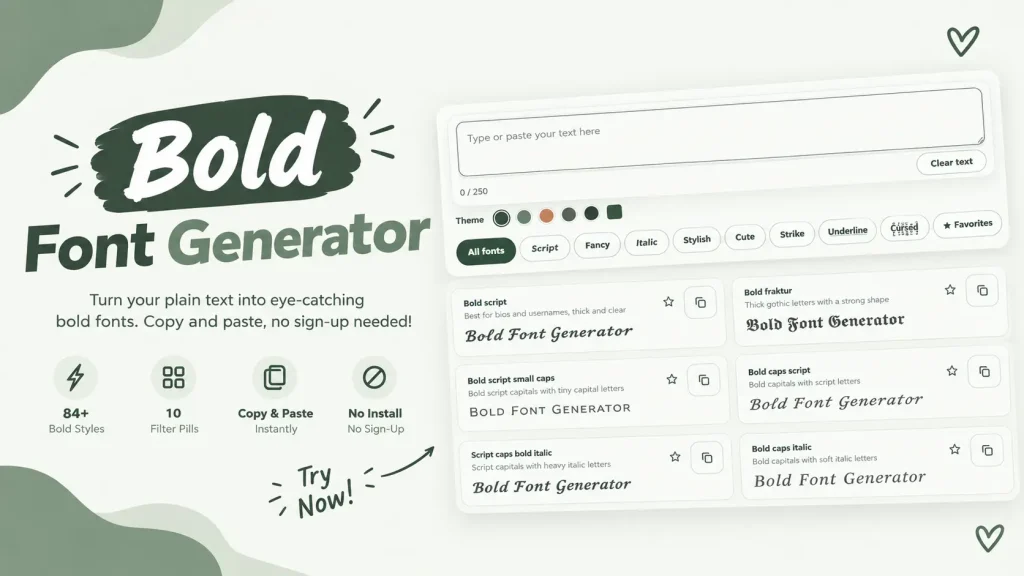
You get 84 bold styles on load, and Load more keeps adding new mixes. Ten filter pills, including Script, Fancy, Italic, and Cute, help you find your style fast. This guide explains what a bold text generator and a bold text font really are, and where bold text works best.
What Is a Bold Text Generator?
A bold text generator is an online tool that maps each normal letter to a bold Unicode twin. These are not images and not formatting. They are real bold characters from the Unicode standard, which is why a bold text font keeps its bold look after you paste it into Instagram, WhatsApp, or Discord.
With bold Unicode text, the boldness is built into the characters themselves, so bold Unicode text keeps its bold look in most apps, though the exact appearance can vary by device. For a formal handwritten look instead of heavy letters, see our calligraphy fonts page.
Bold characters work on many modern phones, because most include these Unicode blocks. That is the whole idea behind a bold font generator.
How to Use the Bold Font Generator
People often search for a bold copy and paste font when they want text they can style once and use anywhere. This one takes four quick steps. First, type or paste your text in the sticky box at the top, and watch the counter out of 250 characters. Second, scroll through the bold font generator and tap a filter pill like Script or Cute. Third, tap any style card to copy it. You will see a small Bold copied message. Fourth, paste it wherever you want. Example: type sale, pick Sans Bold, copy 𝗦𝗮𝗹𝗲, paste.
To convert to bold text for a second line, change the filter, pick from the bold fonts below, and copy again. Think of this page as a bold writer: type once, copy it wherever plain text works.
If a copy ever fails, the tool tells you to copy it by hand. On older phones, that manual copy is the safest path. Make the text bold in small doses, and make letters bold for headings.
Bold Font Styles
The tool opens with 84 bold fonts, each with its own name and a short note. If you want even more styles beyond bold, try our fancy text generator. Every bold letter font below is a real Unicode alphabet. Type any word and watch it appear in all bold alphabet fonts at once. Good bold fonts share one trait: they stay readable at small sizes.
Sans Bold
Sans Bold is the bold sans serif cut: straight lines, no extra strokes. A clean, modern choice for social media. Example: 𝗛𝗲𝗹𝗹𝗼, thick and clean at small sizes.
Serif Bold
Serif bold is the classic newspaper cut, with small feet at the ends of each stroke. It feels formal, a strong pick for headlines. Example: 𝐇𝐞𝐥𝐥𝐨, loud and sure.
Bold Italic
Bold italic leans to the side while staying heavy, perfect for emphasis inside a sentence. Example: 𝑯𝒆𝒍𝒍𝒐, made to pull the eye.
Bold Script
Bold script is thick handwriting with joined flowing letters. It sits between bold and cursive font, soft enough for bios but heavy enough to stand out. Example: 𝓗𝓮𝓵𝓵𝓸, soft yet strong. For a more formal handwritten feel, try our font calligraphy styles.
Beyond the big four, extra flavors like double-struck, fraktur, fullwidth, and monospace are listed as “letter fonts bold” styles. Some people even search for font style bold when they simply mean a bold font style with extra decoration. Each card shows a live preview, and the star saves your favorites.
Which Bold Style Should You Pick?
Match the bold typeface to the job: loud bios want the strongest cut, headlines want weight, single-word emphasis wants slant, and soft bios want flow. The best bold fonts read well in one glance, so preview the bold typeface at its real size.
Bold typography is about contrast: one bold word inside plain text pulls the eye, but if everything is bold, nothing is bold. For example, a bio line in bold script feels soft, while a headline in bold serif feels loud. For the full flowing look without the bold weight, see our cursive typography collection.
Mix Bold With Other Styles
Bold does not have to stand alone. The Load more button on this bold font generator builds thousands of mixes, pairing bold alphabets with hearts, sparkles, underlines, and glitch effects. A bold lettering font wrapped in sparkles feels festive: ✧ 𝗦𝗮𝗹𝗲 ✧. If bold feels too heavy for a soft bio, cute text styles keep things light and playful. This is how you make fancy bold text of your own.
Try one bold word next to one normal word and let the contrast do the work. For tattoo style mockups, our tattoo fonts page has lettering made for ink.
Where to Use Bold Text
Bold text works in most places where plain text is allowed. A bold font generator shines brightest in these six spots. From bios to chats, a bold lettering font turns plain words into visual anchors.
Instagram Bio and Captions
Bold text made for Instagram, often searched as ig bold font, makes your name line pop in a crowded feed. Try a bold first line, then plain text below. Example: 𝐓𝐫𝐚𝐯𝐞𝐥 𝐝𝐢𝐚𝐫𝐢𝐞𝐬 over a plain bio. Because Instagram cuts bios at 150 characters, keep it to two or three words. For more bio ideas, see our full Instagram fonts collection.
Twitter/X Posts
On a fast timeline, bold the word that carries your point. Example: 𝐑𝐞𝐚𝐝 𝐭𝐡𝐢𝐬 before your tip makes people stop scrolling.
Discord and WhatsApp Chats
Discord and WhatsApp both have their own built-in bold: Discord uses Markdown, and WhatsApp uses asterisks around a word. Unicode bold is the alternative for places native formatting cannot reach, like display names, bios, and status lines. Bold the word you want friends to notice. Example: Party on 𝗙𝗿𝗶𝗱𝗮𝘆 is impossible to miss.
YouTube Titles and Descriptions
A bold title word stands out in search results and suggested videos. Keep it to the main keyword of your video. Example: 𝐁𝐞𝐬𝐭 𝐠𝐨𝐚𝐥𝐬 from last night.
Gaming Usernames
Want your name bold in a game lobby? Type your tag in the tool and copy the style that reads clearest at small sizes. Example: 𝗕𝗹𝗮𝘇𝗲 in a lobby list.
Email Subject Lines
A bold word in a subject line can catch the eye, but Unicode styles do not render in every email client. Use them sparingly, and preview the subject line before you send. Example: 𝗦𝗮𝗹𝗲 ends tonight.
Unicode Bold vs the B Button: When Do You Need a Generator?
Native bold
Unicode bold
Your phone already has a B button, so when do you need a generator at all? It comes down to where the bold needs to live. Native bold is formatting: the app draws normal letters thicker, and it only works inside apps that support it. Use the B button for documents and notes where formatting is supported. Use this generator for bios, usernames, display names, and comments, where formatting cannot reach. For example, Discord renders Markdown bold inside messages, but your display name needs Unicode bold.
Bold Text Takes More Space: Keep It Short
Some bold Unicode styles take up more visual space than normal text, depending on the font and device, so a long bold sentence can wrap awkwardly on small phone screens. Example: 𝗟𝗶𝗺𝗶𝘁𝗲𝗱 𝗼𝗳𝗳𝗲𝗿 fits a bio line, while a full bold paragraph does not.
Make letters bold for two or three words only, the words that carry your point.
What Stays Normal: Numbers, Punctuation, Emojis
Bold numbers exist in Unicode, so 0 to 9 usually get bold twins. Most punctuation has no bold version, so commas and periods stay plain. That is normal, not a bug. Emojis are pictures, not letters, so they never change.
The tool tells you this itself: styles change letters, while numbers and symbols stay almost the same. For bold numbers in dates, type the digits and pick a style that includes them. Example: 𝐡𝐞𝐥𝐥𝐨! keeps the mark plain while the letters turn bold.
Why Does Bold Text Show Boxes on Some Devices?
Bold Unicode text may appear as empty boxes when a device or app does not support certain characters. Try a simpler style like Sans Bold, update your app, or test the text before using it. Display may vary across devices and platforms. For better accessibility, use plain text for important information because screen readers may read Unicode bold letters incorrectly.
Frequently Asked Questions
Conclusion
A bold font generator makes it easy to turn ordinary text into eye-catching Unicode styles you can copy and paste in seconds. Whether you want to highlight your Instagram bio, personalize your Discord username, or make a WhatsApp status stand out, the right bold text style can add emphasis without installing a font or changing your device settings. Explore the available styles, compare their appearance, and choose one that fits your personality. Keep bold text short for better readability, and always check how it looks on your target platform. Try the bold font generator above, find your favorite style, and make your words stand out.