Preview the fonts Roblox Studio really has, build a logo, copy ready Lua code, and check names Roblox will actually accept.
Roblox Font Generator: Preview Studio Fonts, Check Names and Copy Fancy Text
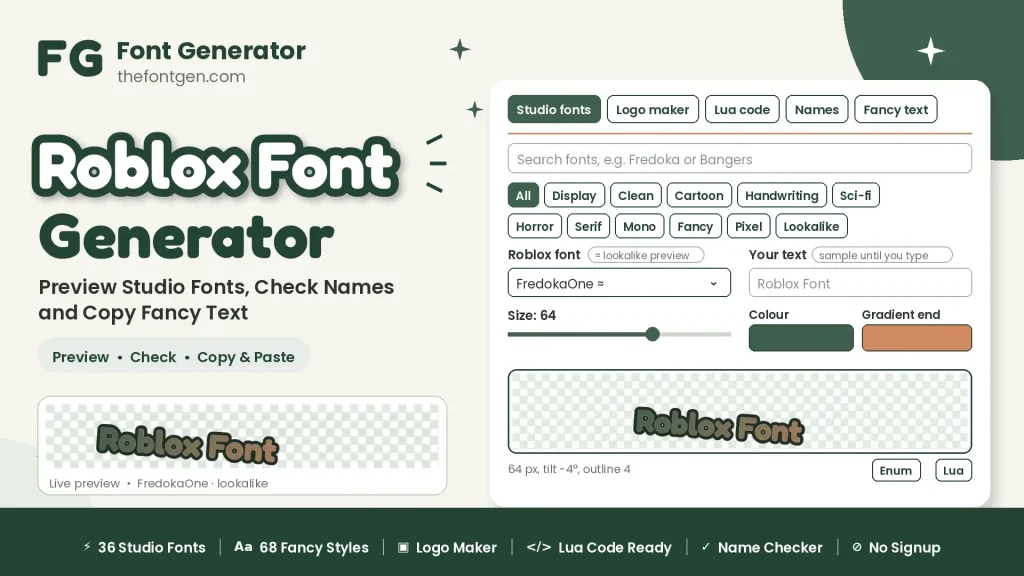
This roblox font lab is one page with five tabs that share a single text box, so you type a name once and use it in every tab. It previews 36 Studio fonts with their real Enum names, builds ready Lua code in three blocks, checks a username against four rules, draws a logo on a canvas, and gives 68 named fancy text styles to copy and paste.
Those five tabs answer three different jobs behind one roblox font search. A creator needs a real font name that Roblox Studio understands, a player needs styled letters that survive a display name or bio field, and a designer needs logo lettering as an image for a thumbnail or group icon.
This roblox font guide keeps those jobs apart, because a style that works in a bio can fail in a username field, and a font file cannot change your name inside Roblox at all. Every roblox font feature below was checked in the tool itself, and every Roblox fact was checked against Roblox sources and the game wikis. The honest limits stay in the open too, such as username availability, which this tool cannot check and only Roblox can confirm.For example, a creator can preview Builder in FredokaOne and copy its Enum name in seconds. A player can check Blox_99 against the username rules and then pick a fancy roblox font style for a bio instead of a username.
What Is a Roblox Font
A roblox font can mean a real typeface that Roblox uses or offers in Studio, or it can mean styled Unicode text that only looks like a new font. The two ideas sound the same, but they work in different ways and belong in different places.
This roblox font text generator covers both sides on one page. The Studio side shows real Enum.Font names with live previews, while the Fancy text side swaps your letters for Unicode characters you can copy and paste.
Three different jobs behind one search
The first roblox font job is building inside Roblox Studio, where an experience needs a real font for buttons, signs and menus. That job needs a font name the engine understands, such as Enum.Font.Bangers for a bold cartoon title.
The second job is styling your own text, such as a display name, a profile bio or a group description. That job needs characters that survive a paste, such as 𝗕𝘂𝗶𝗹𝗱𝗲𝗿 in bold sans, plus a clear idea of the rules of the field before you save.
The third job is making logo style lettering as an image for a thumbnail, a group icon or a banner. In that job the text never needs to be typed inside Roblox at all, because it travels as a picture.
Why copy and paste text is not a font file
A font file is software that a program uses to draw letters in one design. When you install such a file, your design app draws your normal typing in that design, and the letters underneath stay normal.
Copy and paste roblox font styles work the other way round. The generator replaces each normal letter with a different Unicode character that already looks bold, script, circled or squared, so the styled look travels with the text itself.
For example, the word Blox stays as four normal letters in a font file preview, but the Fancy text tab turns it into 𝗕𝗹𝗼𝘅, Ⓑⓛⓞⓧ or Blox. Each result is a row of special characters, not a new typeface on your device.
What Unicode means for your name or bio
Unicode is the shared list that gives every character its own code, including math symbol letters that look like styled alphabets. Because those characters are real text, most apps can show, copy and paste them with no install.
The limit is that the viewing device must have a drawing for that character. When a drawing is missing, the reader usually sees a plain box instead of your letter, which is why simple roblox font styles travel better than rare ones.
For example, bold sans and monospace letters come from common math sets and usually show well on phones and computers. Heavy stacks of marks and rare symbol alphabets are the ones that most often break, get stripped or turn into boxes.
How to Use This Roblox Font Tool
The whole roblox font lab shares one text box and one set of controls on the left, and the five tabs on the right use whatever you set there. Once you learn the shared start, each tab takes only a few clicks for its own job.
The steps below follow the real order of the tool. Type once, style once in the live preview, and then open the tab that matches your goal.
Type your text in the shared box
Type your word or name in the Your text box at the top left, and the live roblox font preview updates as you type. If you leave the box empty, the tool uses the sample words Roblox Font in every preview, which is useful when you only want to compare fonts first.
Multi line text also works, so a two line game title can be styled as one piece.
For example, type Obby World and watch the sticky preview while you change fonts and colours.
Pick a font or start from a Quick style
Open the font dropdown and pick any of the 36 Studio fonts, or tap one of the seven Quick style presets in the panel. The presets are Obby, Tycoon, Horror, Retro, Candy and Clean, plus a science fiction preset, and each one sets font, colours, outline and tilt together.
A preset is a starting point, not a final answer. For example, the Horror preset loads Creepster in solid red with a black outline, and you can then soften the colour or straighten the tilt to match your own game.
Adjust size, colour, outline and tilt
Use the size slider to set your text from 24 to 100, with 64 as the starting point. Card previews cap the shown size at 56 so the grid stays tidy, while the live preview shrinks long text to fit its box.
Pick a main colour and, if the gradient box stays ticked, a second colour for the blend, or tap one of the six gradient chips or ten single colour chips. Set the outline width from 0 to 8 and the tilt from minus 20 to plus 20 degrees, like the sample tilt of minus 4 that gives Roblox style titles their lean.
For example, set the word Ramp at size 80 with an outline of 6 and a tilt of minus 8, and the live preview turns it into a heavy leaning title at once. If the outline starts to eat the letters, drop it back to 4, the starting width the tool itself uses, and the letters open up again.
Use the Studio fonts tab and copy the Enum name
Open the Studio fonts tab to see the font cards, with 12 cards shown first. Tap a category pill or type in the search box, for example Fredoka or Bangers, to narrow the grid to the mood you want.
Tap Use on a card to load that font into the shared controls, or tap Copy Enum to copy its full name, such as Enum.Font.Creepster.
The live preview card has the same help in small form, with an Enum button and a Lua button that copies a ready line for a label.
Make a logo in the Logo maker tab
Open the Logo maker tab, which works as a simple roblox logo maker, and your current text and controls are drawn on a canvas as a logo. Choose a background first, either transparent or one of the three gradient scenes named Purple to teal, Sky and Night, and check the pixel size the tab shows for your canvas before you save anything.
The tab shows a Download PNG button for saving the logo image. Treat that logo as artwork for thumbnails, group icons and banners, because an image cannot be pasted into a name field as text.
For example, the same short title at size 100 makes a much larger canvas than at size 40. Build the large version for a thumbnail that must stay sharp, and the small version for a group icon that will only ever be seen tiny.
Copy ready Lua code for your experience
Open the Lua code tab when you want your chosen font inside your own experience. The tab builds three code blocks from your current font, size, colours, outline and text, and each block has its own Copy button.
The first block is a full LocalScript for StarterGui or StarterPlayerScripts that builds a ScreenGui with a TextLabel. The second block is a RichText version with bold and colour markup, and the third is one line with the newer FontFace form, label.FontFace = Font.fromEnum with your Enum name.
With Bangers picked at size 64 and a thick outline, the copied LocalScript block drops into Studio and your label appears with that font and look, ready to move or resize.
Check a username and generate name ideas
Open the Names tab and type a username in the Check a username box, and the tool tests it against the four username rules as you type. Each rule shows a tick or a cross, with a plain verdict at the end, and the next section explains those rules in full.
For ideas, add a word to include if you have one, choose a max length of 12, 16 or 20, and set the number and underscore options. Tap Generate for exactly 12 names that pass all four rules, such as a set built around the word Ninja, and tap any name to copy it.
Copy fancy text from the Fancy text tab
Open the Fancy text tab and read its warning first, because it changes where a fancy roblox font style belongs. Roblox usernames accept only plain letters, numbers and one underscore, and chat may replace unusual characters with hash marks.
Scroll the style rows, with 12 rows shown first, and tap Copy on the style you like, and the status line shows Copied for a short moment. For example, copy Builder in bold script, 𝓑𝓾𝓲𝓵𝓭𝓮𝓻, for a Discord server name or a channel name, not for a Roblox username.
Why Use This Roblox Font Lab
A roblox font tool earns its place when it saves you a second site, a wasted download or a failed save. This lab was built around those three savings, and this short section states them plainly before the style details begin.
Five jobs without five different sites
Because all five tabs share one text box and one set of controls, you type your text once and reuse the same settings everywhere. A name typed for a Studio preview is already sitting in the Logo maker, the Lua code and the checker, with no fresh start on each tab.
For example, type your game name once, copy the Enum name for Studio, and the same name is ready as a logo canvas and as a LocalScript. On separate single job sites, that same name would be typed again on every page.
Honest counts instead of inflated style numbers
This lab states its base counts plainly, with 36 Studio fonts and 68 named fancy styles, and it labels everything beyond those bases for what it is. Design variants are tagged as design cards, combination rows are mixes of base styles, and lookalike previews carry their tag in the open.
For example, a card tagged as a design card here tells you at a glance that the font is one you already have, wearing new colours rather than a new discovery.
Nothing to install for the core jobs
The Studio and Fancy tabs work in the page, so the core roblox font jobs need no font file and no install. A player on a shared or school computer can preview fonts and copy an Enum name or a styled row without changing that machine.
For example, a creator can test Creepster on a library computer and save the Enum name in a note for Studio work later at home. The result travels as plain text in your notes, not as software left behind on the machine.
Roblox Font Styles You Can Preview and Copy
The roblox font styles in this lab fall into two clear groups. Studio fonts are real engine fonts for creators, while fancy styles are Unicode rows for bios and other apps, and reading them apart saves the most common mistake on pages like this. Both groups sit inside the wider hunt for cool fonts for roblox, but they answer it in opposite ways, one with real fonts and one with characters.
Studio font categories and what each one suits
The Studio grid sorts its 36 fonts with 12 pills, named All, Display, Clean, Cartoon, Handwriting, Horror, Serif, Mono, Fancy, Pixel and Lookalike, plus one science fiction pill. Clean is the largest group with 12 fonts, followed by Handwriting with 5, and the small groups keep rare moods within quick reach.
Clean fonts such as Nunito, Oswald and Roboto suit menus and long labels that players must read fast. Display fonts such as Bangers, DenkOne and Luckiest Guy suit short loud titles, such as a race game banner that reads Track Kings, while Creepster and GrenzeGotisch carry the Horror pill for dark games.
For example, a tower defence menu usually reads better in JosefinSans. A haunted house sign earns its mood from Creepster, and the pill row lets you test both moods in seconds.
Lookalike previews and Quick style presets
Nine of the 36 previews carry the lookalike tag, including FredokaOne, both BuilderSans weights, Arcade, SciFi, Bodoni, Garamond, Cartoon and Code. The tag means this page draws that preview with a close matching web font, because the real Roblox font file is not loaded in your browser.
The Enum name on the card is still the real name Studio will use.
For example, BuilderSansExtraBold is drawn here with Figtree and GothamBold with Montserrat, but copying Enum.Font.BuilderSansExtraBold into Studio gives you the true Builder Sans.
The seven presets then turn one click into a full design, with font, colours, outline, tilt and logo background set together. Obby pairs Luckiest Guy with warm yellow to orange, Tycoon pairs FredokaOne with a teal to purple blend, Candy loads Bangers in pink to lavender at a tilt of minus 6, and Clean pairs BuilderSansExtraBold with plain white and no gradient.
Fancy text styles for bios and other apps
The Fancy text tab holds 68 named base styles, built from 22 letter transforms, 17 effect styles, 17 wraps and 12 ready combos. The transforms include bold serif, script, fraktur, double struck, monospace, circled, squared, fullwidth, small caps and upside down.
For the word Builder, the tab gives you 𝐁𝐮𝐢𝐥𝐝𝐞𝐫 in bold serif, 𝔅𝔲𝔦𝔩𝔡𝔢𝔯 in fraktur, 𝔹𝕦𝕚𝕝𝕕𝕖𝕣 in double struck and ʙᴜɪʟᴅᴇʀ in small caps. Effects add lines such as underline or strikethrough, wraps frame the text, such as ★ Builder ★ in the Stars wrap, and the script rows give profile pages the flowing finish a script text maker is used for.
Short bold headings are where a strong text maker look earns its place, while circled and squared rows suit labels where each letter should stand apart. One honest limit shows in small caps, where the letter x has no special glyph in the map and stays plain, so Blox in small caps comes out as ʙʟᴏx and short names should be tested letter by letter.
What Load more really adds in each tab
Load more adds 12 more cards or rows per click in both grids, but it does not keep finding new base fonts. In the Studio grid, the first clicks reveal the rest of the 36 base fonts, and after that the grid fills with design variants of the same font set.
Those variants come from a built pool of 19,440 design combinations, made from the 36 fonts mixed with 12 palettes, 5 tilts, 3 outline widths and 3 sizes. In the Fancy text grid, Load more pulls generated combinations of the base styles, wraps, marks and spacing effects from a built pool of 5,005 combination styles, so the honest base count stays 68 named styles.
For example, after the Clean fonts run out, a Load more click may show Nunito again with a new palette and a tilt of 6, on a card whose tag adds the word design after the word Clean. That card is a fresh outfit on a font you already have, not one more base font, and a Fancy side row that pairs bold sans with a wrap you have not tried is a fresh mix in the same way.
What Font Does Roblox Use
There is no single answer, because Roblox uses one font family for its app and website, and different lettering for its logo across the years. Most roblox font pages that give one name for everything are mixing the logo, the interface and Studio into one wrong answer.
Today the platform font is Builder Sans, part of the Builder family Roblox made for itself. The logo is custom lettering, and Studio still offers older families such as Gotham as choices for creators.
The current platform font is Builder Sans
Builder is the custom font family Roblox announced for creators in March 2024, with Builder Sans for the platform, Builder Extended for bold expressive use and Builder Mono for coding work in Studio. Roblox described Builder Sans as its platform font, designed for high readability across the app, the website and the Creator Hub, and the website moved to it in April 2024. When people ask for the roblox font family by name, Builder is that family, with Sans, Extended and Mono under one roof.
In Studio the family appears as real choices such as BuilderSans, BuilderSansBold and BuilderSansExtraBold, and the bubble chat default uses a Builder Sans medium weight. This lab previews both BuilderSans weights as lookalikes drawn with Figtree, but the Enum names you copy give your experience the true family.
The font Roblox used before Builder
Before Builder, the Roblox website drew its text mainly in Gotham ScreenSmart, according to CSS based sources and older guides that read the site code of those years, where the family was listed as HCo Gotham SSm, and font history records point to Source Sans Pro on earlier pages. That history is why older roblox font guides still answer Gotham when someone asks what font Roblox uses.
Gotham has not vanished, because creators can still pick GothamBold and GothamBlack in Studio today, and this lab previews both with Montserrat.
For example, a creator updating an old experience may keep GothamBlack titles for the feel players remember, while a new experience that wants to match the current platform should usually start from Builder Sans.
Why the logo font is a different question
The Roblox logo is lettering drawn for the brand, not a font you type with. Roblox called the 2022 version new custom letterforms, lighter in weight, with the second o back as a letter and the famous tilt kept in place, and logo databases often identify that lettering as a modified Gotham Ultra. That is why the roblox logo font search has no file at the end of it, because its answer is custom lettering rather than a typeface.
Roblox itself only calls the lettering custom, so there is no official roblox font file for the logo that Roblox gives away. For example, the tilted square in the logo is a brand symbol, not a character in any font, and the tilt control in this lab borrows that lean for your own text without claiming to be the logo.
Classic Roblox Font and the Roblox 2017 Font Story
The history behind the classic roblox font explains why download sites argue about its name. The oldest logo was drawn by hand, the 2017 logo was built on a known typeface, and the 2022 logo went back to custom lettering, so a page that names one font for all three eras is usually guessing.
The classic 2006 lettering had no official font name
The classic logo Roblox used from 2006 was custom lettering, drawn by illustrator Mike Rayhawk as part of a website redesign mockup and adopted as the official logo in November 2006. Logo records list its typography simply as Custom for every version up to 2017, so the classic roblox font as a real named typeface does not exist.
Fan made files such as Old Roblox on DaFont and Boblox Classic on FontSpace are lookalikes drawn to copy the old letters. The chunky uneven letters of 2006 feel close to Luckiest Guy, a real Studio title font by Astigmatic, but no reliable source makes Luckiest Guy the classic logo font.
What changed in 2017 and in 2022
In January 2017 Roblox replaced the classic lettering with a new logo built on a modified Gill Sans Ultra Bold, with heavy clean letters and the o letters turned into tilted squares. This era is the source of the roblox 2017 font name on download pages, where files such as Roblox 2017 copy that Gill Sans based look, and the only change in 2018 was colour, when the lettering turned monochrome.
The August 2022 refresh kept the tilt and made the lettering lighter and more modern, with both o letters drawn as letters again, and chief David Baszucki described the tilt as a sign of building, progression and motion. Branding credits for that identity name the in house team with DixonBaxi for branding and Colophon Foundry for type work, and the lettering is still described as custom.
For example, compare the two moods in the Logo maker tab, where a heavy GothamBlack title at a tilt of minus 4 feels close to 2017. A lighter Clean preset title feels closer to 2022, because the later look comes from lighter strokes and more air.
Old Roblox font generator searches and lookalike fonts
Many people who search for an old roblox font generator do not want a file at all. They want their own name or game title drawn in that chunky classic mood, as an image or as a Studio title, and this lab gives the closest honest route through Luckiest Guy, Bangers or DenkOne at a strong outline and a small tilt.
Those fonts carry the playful weight of the era, and the tool never claims they are the original lettering. For example, set the title Block Kart in Luckiest Guy at size 90 with an outline of 6 and a tilt of minus 6, and a plain modern title turns into chunky classic era artwork for a thumbnail. For a softer round result, a bubble text maker style suits party and obby art better than the true classic look, so match the tool to the era you mean.
Roblox Font Download vs Copy and Paste Text
The roblox font download search and the roblox font copy and paste search look alike, but they end with two different objects. One ends with a file on your device, and the other ends with styled characters in your clipboard, and knowing which object you need saves a wasted download or a failed paste.
What a font file does, and what this tool downloads
A TTF or OTF file is installed on a computer or phone, or uploaded into a design app that accepts custom fonts, and programs such as a photo editor then draw your normal typing in that typeface. The file changes nothing inside Roblox itself, because text fields on Roblox never read font files from your device, so an installed fan font cannot style your display name, bio or chat.
This lab does not offer a roblox font download in font file form, and there is no TTF, OTF or WOFF file behind any button here. The Studio tab copies Enum names, the Lua tab copies code, the Names tab copies names, the Fancy text tab copies styled text, and the only file shaped output is the logo image on the Logo maker tab, which shows a Download PNG button on that tab.
For example, a designer may install a fan made classic style file to set a thumbnail title in a video editor, which is a fair use of a download. If a page elsewhere promises the official roblox font as a free file, read it as a fan recreation with its own licence, such as the well known DaFont listing that is a demo for personal use only.
What copy and paste text does inside a text field
Copy and paste roblox font styling is the opposite object, because the style travels inside the text itself, as special Unicode characters that a field either accepts as they are or refuses, strips or shows as boxes. 𝗕𝗹𝗼𝘅 pasted into a bio usually shows as bold letters for exactly that reason, with no install and no file involved. A fan font licence also covers only the file its maker drew, and it gives no rights over the Roblox name, logo or tilt mark, which belong to Roblox Corporation, so paid work such as merch needs far more care than personal fan art.
How to Change Roblox Font
The search how to change roblox font usually hides three smaller questions. Players want a new look for their name, creators want new fonts in a game, and some users want to change the font of the Roblox app itself, and each question has a different honest answer.
The honest answer for the Roblox app
The official Roblox app and website give players no font picker and no font setting for how the platform itself looks, and since April 2024 that look is Builder Sans. People sometimes call a styling tool a roblox font changer, but a tool like this one changes your text, not the app, so the menus around your styled name stay in Builder Sans.
Third party launchers and browser extensions can change Roblox on your own device only, and Bloxstrap, the best known Windows example, describes itself as an unofficial bootstrapper that Roblox does not make or endorse. Other players never see those changes, such tools can break after Roblox updates, and no source here can promise that unofficial software is safe for an account.
For example, an extension that swaps the website font back to Gotham changes roblox.com in your own browser only, and your friends keep seeing Builder Sans on their screens. That gap is the simple test of any changer claim, because a real change to your account would look the same to everyone.
Change your display name in the official settings
To change the name other players see, open Settings on Roblox, go to Account Info and tap the pencil or Change Display Name control beside your name. Type or paste your new name and save it, and Roblox checks it against its rules before accepting it, so test any roblox font style in this lab first.
Display name changes are free, and support based guides agree that Roblox lets you change yours once every seven days. For example, paste a short bold sans version of your name, read it once for spelling and boxes on your own screen, and keep a plain version written down in case the filter asks you to simplify.
Change fonts inside your own experience in Studio
Creators change fonts where players cannot, inside their own experience in Roblox Studio, by selecting a TextLabel, TextButton or TextBox and setting its Font or FontFace property in the Properties panel. Scripts do the same job, and the Lua tab in this roblox font lab writes the line for you, such as the LocalScript block with Bangers chosen at your size, colour and outline.
The Script Editor inside Studio has its own font setting for code text. That setting changes only how your scripts look while you work, not what players see in the game.
Roblox Custom Font Options for Creators
A roblox custom font request means something specific inside Studio, because creators are not limited to typing styled characters. They can choose real font families for their interface, bring in more families through the Creator Store, and set them with the FontFace property that points at a font family asset instead of only an Enum name. A full list of fonts in roblox studio is longer than any one page needs, so this lab previews the 36 names creators reach for most.
Studio ships with a long list of built in families, and the 36 previews in this lab are the Enum.Font names creators reach for most, from Roboto and Ubuntu to Creepster, Arcade and Permanent Marker. Roblox released the Builder family through the Creator Store itself, so experiences could match the platform font from the day it was announced, and store families also help themed games, such as a story game that needs an old book feel from Garamond or Merriweather on every sign.
A custom font inside your experience changes only your experience, not the Roblox app around your game or the name above your avatar outside your world. For example, a horror game can set Creepster on its warning signs and still show player names in the normal platform style, because system areas belong to Roblox and bubble chat follows the chat settings of your experience, with a Builder Sans medium default in the current docs.
Roblox Username and Display Name Rules
Most roblox font problems are really rule problems, because the username and the display name accept very different text. The username is a strict login style identifier, while the display name is a looser public label with a filter, and this lab keeps the two apart in the Names tab.
Username rules this checker follows
A Roblox username must be 3 to 20 characters long, may use only letters, numbers and one underscore, and that underscore cannot sit at the start or at the end. The checker in the Names tab tests exactly those four rules as you type and marks each one with a tick or a cross, and names such as Builder and Blox_99 pass all four while a two letter name such as ab fails on length alone.
Styled Unicode letters are not allowed in a username at all, so no fancy roblox font style can ever become your username. For example, 𝗕𝘂𝗶𝗹𝗱𝗲𝗿 looks like a bold name, but the username field will reject its characters, while plain Builder may pass the rules if it is still available.
Display name rules and the seven day wait
A display name does not need to be unique, appears on your profile and above your avatar in experiences, and can hold spaces and some symbols and scripts, so simpler styled letters often pass a filter check rather than a strict character list. A name that breaks the Community Standards may be reset to your username, and most tools and guides work to a top length of 20 characters for display names, even though the help page itself does not print that number.
For example, two players can both show the display name Star Builder, which no username rule would allow, because their unique usernames underneath keep them apart. The checker in this lab also cannot tell availability, since only Roblox can see its taken names and current filter decisions, so keep two or three favourites from the 12 generated names in case your first choice is taken.
Where Can You Use These Roblox Font Styles
A roblox font style that works in one field can fail in the next field on the same page. The safe way to think about it is field by field, with the strictest fields first and the free fields last, and with a short test in the exact field before you share the result.
Display names, profile bios and chat
The display name is the main home for simpler styled letters, such as bold, italic, small caps and common math alphabets, because the filter reads the name when you save and heavy decoration is the first thing it questions. Your profile bio, often called the About section, gives the widest room, with a limit widely reported as 1,000 characters, and bios hold symbols and decorated lines well while a failed bio edit costs nothing but a retry. Most roblox display name fonts that survive are exactly those simple families, because they use common characters that the filter and most devices already know.
For names and bios across the web, the same clean styles travel into most profile fields, which is what a good stylish text maker result should do. For example, a bio line such as ★ 𝗦𝘁𝗮𝗿 𝗕𝘂𝗶𝗹𝗱𝗲𝗿 ★ with a plain second line reads well and stays easy to search. If you came here looking for a roblox bio font, that clean bold style is the safest kind to start with, because it reads well and rarely turns into boxes.
Chat is filtered by Roblox and rendered in the font of the experience you are playing, so pasting styled text does not change the chat font itself, and a styled message may pass, lose characters or turn into hash marks. Never use styled letters to hide a word the filter would block, because moderation judges the meaning, not the decoration, and a bold sans hello to your team is the kind of simple roblox font use that usually survives.
Game pages, groups and other apps
Experience titles, descriptions and group pages are typed by their owners in Studio or the Creator Hub and are moderated like other public text, while the font face inside an experience is a Studio setting rather than a paste trick. That is why the Lua code and Enum copy buttons in this roblox font lab matter more to creators than any fancy row, since a tycoon owner can set every shop sign in FredokaOne through code that renders the same for every player.
The Fancy text tab names its own best homes, which are Discord, YouTube, TikTok and bios on other apps, where far more Unicode is accepted and wraps and combos can survive. For example, the Bold sans plus brackets combo frames Builder in a way that looks at home in a server list, and a fancy text maker result can carry the same name onto every bio you own, as long as you keep your channel text styles consistent with the name players see in game. The same habit travels across games too, because a player who styles a Roblox name today often hunts for matching free fire nicknames in the other game on the same phone.
When the job is a thumbnail, a group icon or a banner, an image is the right tool and the Logo maker tab is the right start, because letters drawn once as pixels travel to every screen with no glyph lottery. For example, a horror thumbnail set in Creepster with a red fill and black outline looks identical on a phone and a television, where the same title pasted as Unicode could lose letters on one of those screens.
Adopt Me, Bloxburg and other experience fields
Inside big experiences, names appear in more places than your profile, such as pet names in Adopt Me or house signs in Bloxburg, and those fields have their own filters and lengths set by the experience owner. A roblox font style that passes in your bio may still fail on a pet, so keep these names short, because many fields cut text early and a long wrap can eat the space your real name needed. Searches for adopt me fonts land in this same field by field world, because pet names follow Adopt Me rules rather than profile rules.
A pretty text maker style suits pet names and cute house signs, where a gentle look matters more than volume. A pet named ʙᴜʙʙʟᴇ in small caps reads clearly in a short field, while the same name wrapped in stars and crowns would likely be cut, filtered or shown in boxes to other players.
Roblox Doors Font and Spooky Styles
The roblox doors font is the clearest gap in this whole topic, because most roblox font generator pages skip it completely. Players meet the tall eerie letters of the Doors logo and want that exact font for their own names and art, and the honest answer is short while the useful answer is about mood.
What is actually known about the Doors logo
Doors is the horror experience by the LSPLASH group, developed by Lightning_Splash with RediblesQW and released in August 2022. The game wiki states the fact plainly, in words close to these: the font for the Doors logo is custom, but there is a recreation of it called do0rness, and that is the only verified roblox doors font fact in this research.
Pages that name Oswald, or any other normal font, as the official Doors font are repeating community guesses that disagree with each other. For example, the letters on the You Died screen are often debated in fan threads, with no settled source behind any claim, so treat every such claim as a guess until LSPLASH or the game wiki says otherwise.
Spooky styles that copy the mood honestly
You cannot copy the Doors letters, but you can copy their mood with tools that never pretend to be the original, such as Creepster and GrenzeGotisch under the Horror pill in Studio. In fancy text, fraktur rows such as ℌ𝔬𝔩𝔩𝔬𝔴 carry the sharp old letter mood that horror art loves, and a flip text tool style can add an unsettling twist to a bio line while the name itself stays readable.
Horror names work best when the style supports the words, so pick words with built in dread, such as Hollow, Grin or Static, and add one layer of style rather than three. For example, HollowGrin passes the username rules as plain text, and its fraktur twin on Discord then feels like a logo rather than a puzzle.
Why a Roblox Font Stops Working
When a styled roblox font name fails, the cause is usually one of three things, the field rules, the filter or the viewing device. Each cause has a different fix, so work through them in order, because most failures are solved by a simpler style rather than a more complex one A screen reader may also read a styled name letter by letter, so a fancy display name can sound confusing even when it looks clear on screen.
The filter, hash marks and boxes
Roblox filters public text to keep the platform safe, and display names, bios and chat all pass through that filter, which may block a save or replace parts of the text with hash marks. Unusual characters draw extra attention, accounts for younger players are usually filtered more strictly, and a style that saves on one account can fail on another, which is why friends sometimes report opposite results for the same roblox font name.
A box, sometimes called tofu, appears when the viewing font has no drawing for your character, so the text is correct in the field but the phone, console or experience font cannot draw that letter. Common math alphabets such as bold and italic survive well, while rare blocks and long stacks of marks are the first to fall into boxes, above all inside experiences that use their own narrow fonts, as with monospace 𝙱𝚞𝚒𝚕𝚍𝚎𝚛 showing on most screens while a stacked name collapses on an older tablet.
Fixes to try before you change the whole name
Start by removing wraps, marks and symbols and keeping only the letter transform, because if the name saves then, the letters were fine and the decoration was the problem. Next, swap a rare style for a common one, such as bold sans, italic sans or small caps, and shorten the name, since styled characters can behave longer than they look and a name near the limit may fail on size rather than content.
A long crowned and starred script name that fails may save at once as plain bold sans. You keep the bold identity, lose the fragile parts, and spend your display name change on a version that should last.
Tips for Choosing a Roblox Font That Lasts
A good roblox font choice survives filters, small screens and your own changing taste. Read these tips before you save a display name or set a game font, because a minute of testing here saves a week of waiting later.
Keep one strong style instead of stacking three
One clean transform reads as a design, while three stacked layers read as noise, and every added mark is one more character for a filter to question or a device font to miss. For example, 𝗤𝘂𝗲𝘀𝘁 in plain bold sans needs no help, while the same word with a crown wrap and a dotted effect may fail the filter, the field or the screen, so choose a frame only with plain or bold letters inside it.
Test on a phone before you trust a style
Most players will meet your name on a phone first, and thin script or heavy outlines blur at small sizes above an avatar in a busy game, so the phone is the honest test of any style. If a style fails the phone test, move one step stronger, such as script to bold script or italic to bold italic.
Match the font to the job, not the trend
A menu must be read, a logo must be remembered and a username must obey rules that no trend can bend, so the job should pick the roblox font, not the fashion of the week. For example, an obby that sets every label in the Arcade preview may look fun in a screenshot and tire players within ten minutes of reading, while a clean font on those same labels keeps the game easy to play.
Frequently Asked Questions
Conclusion
The roblox font topic makes sense once you split it into its three real jobs. Creators need real roblox font names and code, players need styled characters that respect field rules, and designers need logo style lettering as an image, and this lab is built around that split.
With 36 Studio fonts and their Enum names, ready Lua blocks, a logo canvas, a rule true name checker with 12 ideas per click, and 68 fancy styles for the places where fancy text belongs, and those five jobs sit on one page with their limits stated in the open. Start with the job in front of you, test your roblox font choice in the live preview, and keep the style simple enough to survive the field you chose, and it should still look good long after the first save.